
Key Takeaways
A shared drive stores files well. A digital asset management (DAM) platform adds metadata and AI search on top of storage, plus approval workflows and version control, so brand governance is easier to enforce.
Stay on a shared drive if you run a single brand with a small content team. Low compliance risk makes that the practical choice.
Switch to a DAM once you manage multiple brands or work with external partners. Growing asset volume and brand-safety requirements strengthen the case.
Migration rewards planning. You can start by inventorying assets and designing metadata. Pilot one brand, then roll out to partners.
BrandLife pairs a modern DAM with multi-brand workspaces and AI search. Partner portals come built in, and Starter runs $150/month.
A shared drive stores files, while a DAM governs them, adding metadata, search, version control, and approvals on top of that storage. Your creative lead spent 45 minutes finding the Fall hero image, and it turned out to be last year's version. That's the shared-drive tax, and teams feel it every week.
Slite's Enterprise Search Survey Report, published in early 2026, found that the average worker loses 3.2 hours a week re-finding information that already exists somewhere in the company, which adds up to over 166 hours a year per person, more than a full month of work.
Brand and creative teams now manage more channels and more partners than folder structures can govern, and AI-generated content adds even more volume, widening the issue between storage and governance. This is a middle-of-funnel guide for brand ops and marketing ops leaders weighing whether their shared drive still holds up.
A shared drive is the right call for a single brand with a small content team and low compliance risk. A DAM becomes the right call once you manage multiple brands, share assets with external partners, or need an audit trail for what ran where and who approved it.
In this article, we start with what shared drives do well, then compare the two options feature by feature, cost, and migration effort. We close with the signals that mean it's time to move and which setup fits your team. We'll stay fair to storage tools like Google Drive and SharePoint, since they're genuinely strong for storage; a DAM handles governance and workflow on top of that.
How Does a Shared Drive Help
A shared drive handles storage and team access well, but it has no native metadata, approval routing, or governance controls, which is why search and version chaos become its two biggest failure points.
Every new hire already knows how to use one, and that familiarity has real value. A shared drive usually comes bundled with Google Workspace or Microsoft 365, so the tool feels free and training needs to stay light. For generic documents and early-stage single-brand teams, folders work. Google's own guidance on shared drives highlights team ownership and central access as real strengths, since files belong to the team instead of one person, so access stays intact when someone leaves.
What are the Challenges with Shared Drive
Search is usually the first crack. Finding an asset depends on someone naming the file well and placing it in the right folder. Human discipline slips, and version chaos follows. You end up with v2_FINAL_FINAL living next to three near-identical crops.
Approvals scatter across email and Slack, so the audit trail gets thin fast. Teams lose track of which asset got signed off and when. Permissions often become broad or link-based, which makes precise access control harder. Two terms matter here. Metadata is the descriptive information attached to a file, like campaign or usage rights. Brand governance is the set of rules that keeps every asset on-brand and compliant. Folders alone handle little of either job. As asset volume and user count rise, structure gets harder to maintain.
Shared Drive vs DAM: The Side-by-Side Comparison
Across nine core capabilities, a DAM outperforms a shared drive most sharply on search, version control, and multi-brand governance, the three areas where folder-based systems have no native equivalent.
Feature-by-feature comparison table
Caption: How shared drives and DAM platforms compare across nine capabilities that matter to brand and creative teams.
One pattern runs through every row. Shared drives store files. A modern DAM platform organizes and governs assets across their full lifecycle.
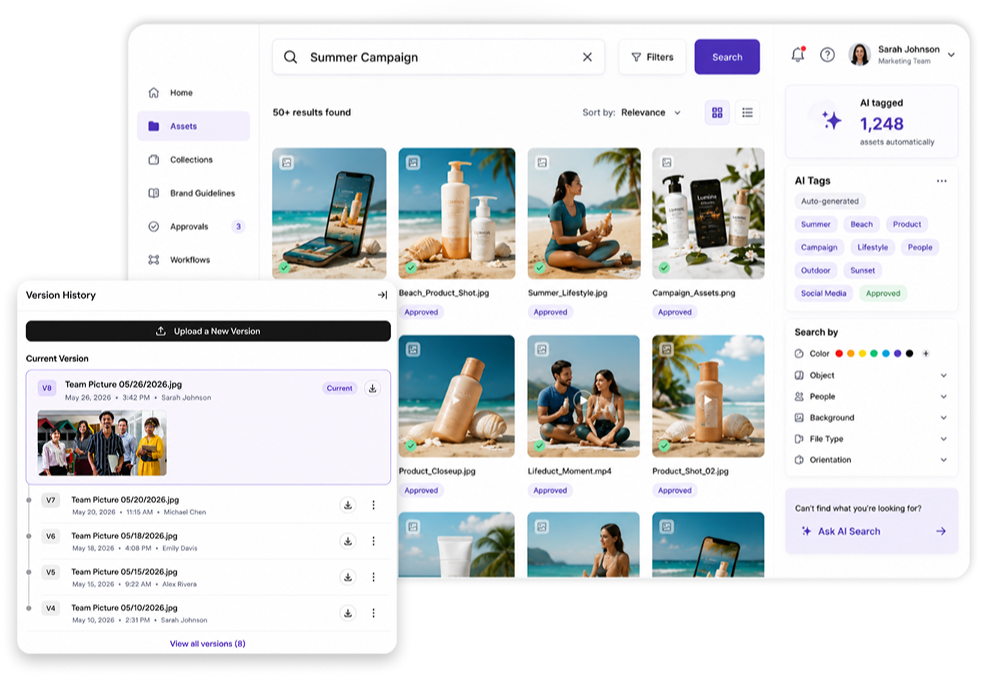
There are two wide challenges. AI-powered search and tagging turns a folder pile into a searchable library. Multi-brand workspaces keep brand X and brand Y cleanly separated.
Governance is where the stakes rise fastest. Newer DAM tools can embed AI agents that audit assets against brand and legal guidelines, then flag issues for review. Human oversight stays central to that model. A State of DAM 2025 survey reports that 9 in 10 respondents view human approval as essential to protect brand identity and compliance.
The Cost Comparison: "Free" Shared Drives vs DAM Pricing
A shared drive's real cost isn't the near-zero subscription line. It's the search time, rework, and audit gaps that show up nowhere on an invoice, while DAM pricing itself runs well into the hundreds per month once you move past entry tiers.
The monthly line item for a shared drive looks small because it sits inside Microsoft 365 or Google Workspace, but the real operating cost shows up elsewhere. Search time is the quietest expense. According to Monotype's 2025 Scaling Creative Operations report, 57% of creative teams spend more than a quarter of their time on non-creative tasks like asset management, compliance checks, and workflow bottlenecks, largely because there's no reliable way to know what already exists. When teams can't find an approved asset, they recreate it, paying twice in designer hours and production costs for something that already exists somewhere on a shared drive.
Rework comes next: without governance, people ship off-brand or outdated assets, which creates redos and reputational risk, and regulated industries feel this especially hard. Auditability is the third challenge, since proving which asset ran where, and who approved it, gets difficult when the record lives across email threads and chat messages.
DAM pricing itself spans a wide range. Capterra's current overview of DAM software puts entry-level plans at an average of $74 per month, with premium and advanced-level subscriptions averaging $459 per month. Enterprise-oriented setups often list "contact for pricing," and real deals usually depend on users, brands, storage, and integrations.
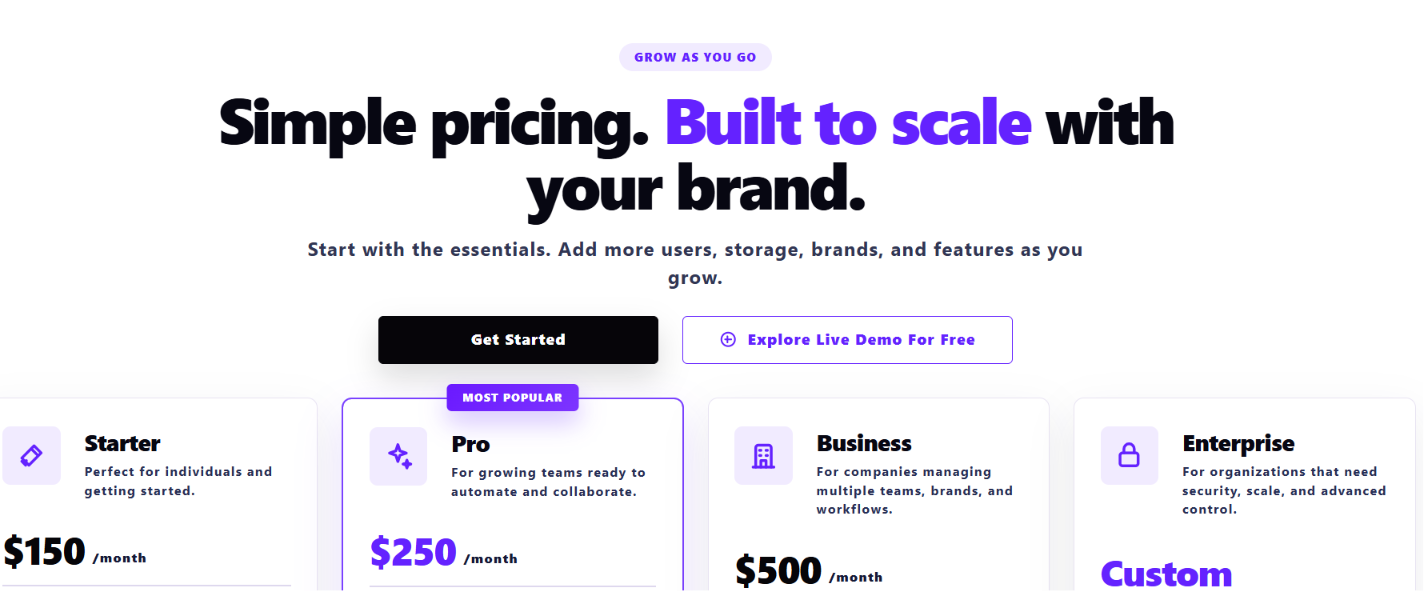
BrandLife keeps the model transparent. Starter runs $150/month for one user, one brand, and 1GB of storage, sitting below the category average for entry-level plans. Enterprise pricing is custom. Three cost drivers are worth watching as you compare options:
-
Storage overages can add monthly fees once you move past the base tier
-
Seat-based pricing can rise when you extend access to partners, so portal access matters
-
Integration and API work may sit outside base pricing and pull in internal dev time
Implementation and Migration Effort
A DAM migration succeeds or fails on the metadata plan, not the platform, so inventory and taxonomy design should come before a single file gets moved.
The switch usually goes sideways when a team dumps a huge file library into a new tool before building a metadata plan, so a phased approach matters more than the platform choice itself.
Start with an inventory. Map your assets and stakeholders across every drive, then flag duplicates and risk areas. Next, design your brand hierarchy and taxonomy, the classification structure that groups assets by brand, campaign, or channel, so assets have a logical home. Then define metadata fields that match how your team searches, with campaign and channel as common starting points. Pilot one brand or one region before you scale, so you can refine the rules on a smaller set, and roll out to external partners last, once internal governance feels stable. Mid-market rollouts commonly run a few weeks to a few months, based on asset volume and planning depth.
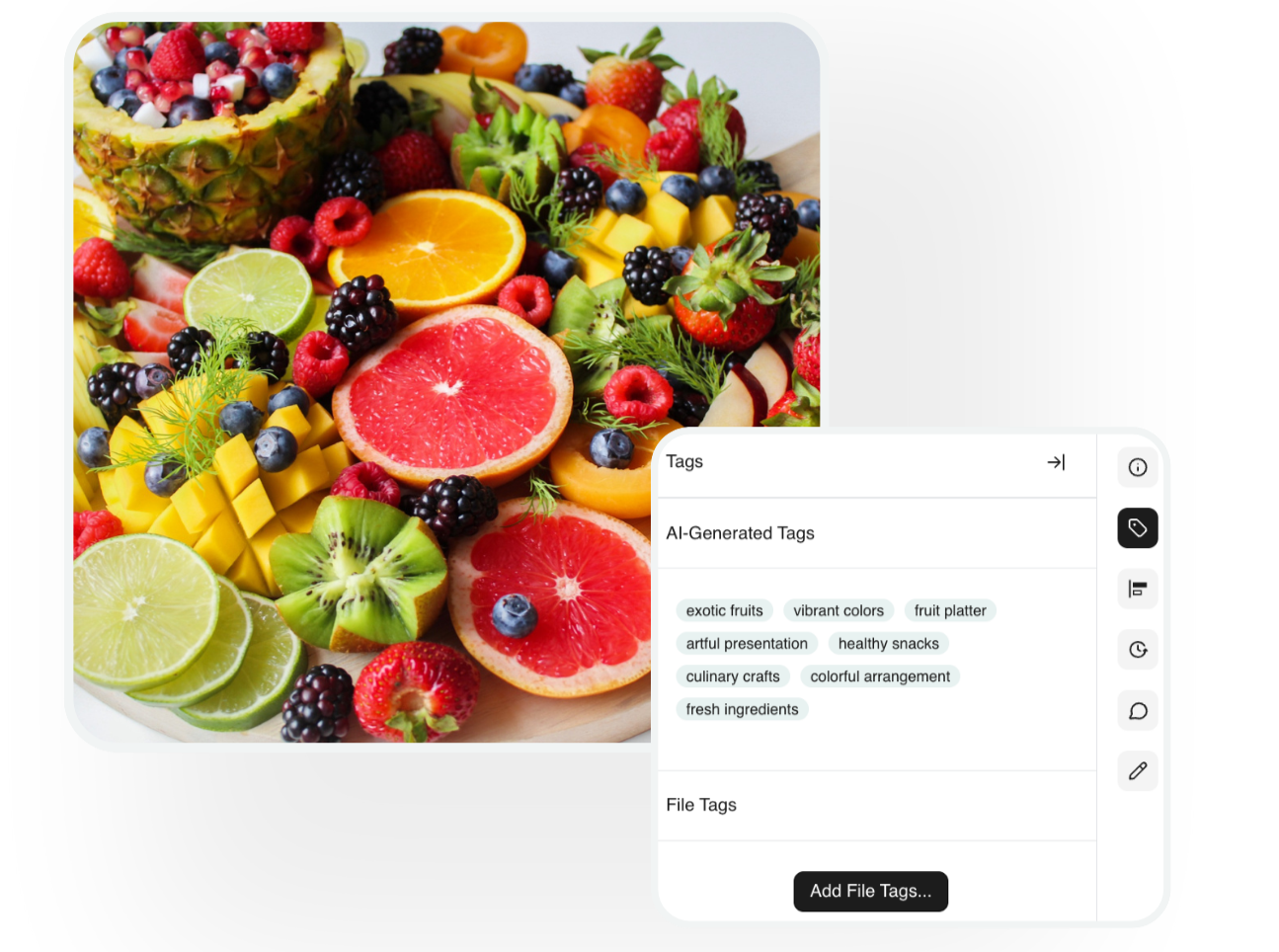
Time-to-value improves when setup is straightforward. AI auto-tagging helps carry the metadata load, so your team avoids a long manual tagging sprint and gets searchable assets sooner. BrandLife connects with storage tools like Google Drive and SharePoint, plus Canva and Figma, so assets move from the tools your team already uses.
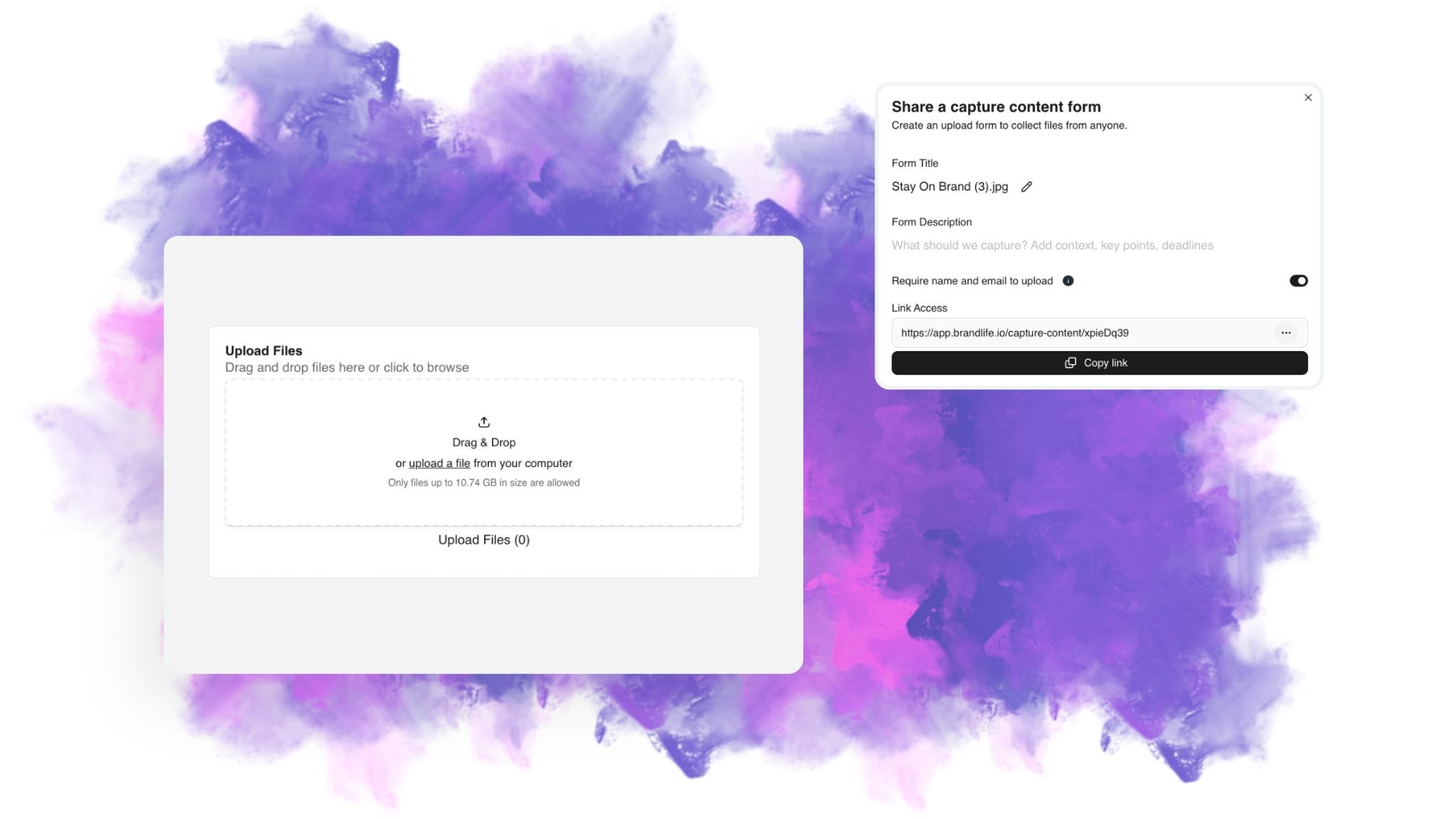
The Capture Content Portal handles the front end of ingest, letting photographers, agencies, and field teams upload directly into the DAM, tagged and organized on arrival instead of piling up in email.
When to Switch: Signals Your Shared Drive Is Holding You Back
Two or more of these signals together, off-brand assets in the market, rising asset-request emails, or version chaos across teams, usually mean a shared drive has been outgrown.
Most teams don't circle a switch date on the calendar. The decision usually comes after one launch gets delayed by file chaos, and the warning signs differ slightly by role.
Brand ops signals
Old logos and off-brand visuals reaching the market are usually the first warning sign, since guidelines may live in stale PDFs and scattered SharePoint pages that teams lose track of. Multi-brand complexity pushes folder naming even harder once you manage sub-brands that need clear separation, and compliance pressure rises too, since you need to prove which assets ran where, but the drive spreads that evidence across inboxes and chats.
Marketing ops signals
Asset-request emails multiply when marketers spend too much time searching and asking designers for the same file twice. Campaign kits and sales enablement content end up scattered, so each channel brings another manual download and re-upload, and usage rights add a hidden trap: without metadata that tracks rights and expiration, expired creative can slip back into circulation.
Creative and design ops signals
Version chaos spreads fast when agencies and designers each keep their own folder systems, and the global view of what's approved or in flight disappears. Teams recreate assets they struggle to find or trust, burning creative capacity on work already done once, and approvals add drag as structured review gives way to email chains.
A quick self-check
If you manage more than one brand or field constant asset-request emails, your setup is likely straining. One signal is a yellow flag; two or three together usually mean it's time to move. BrandLife customers report 40% less time searching for assets, 70% fewer asset-request emails, and 6+ hours saved weekly per creative, an issue that shows the difference between storage and a system built for daily brand workflows.
Which Setup Matches Your Team
Match your setup to complexity. A single brand with under 10 creators stays on a shared drive, a growing single brand working with agencies adds a DAM as its brand library, and multi-brand or multi-region operations run the DAM as a fully governed hub.
Horizon 1: Stay on the shared drive
A single brand with fewer than 10 core content creators fits this stage well. Regulatory risk stays low, and external partners touch your files only occasionally, so basic naming conventions and a simple folder taxonomy can hold up here.
Horizon 2: Introduce a DAM as your brand library
Growing channel count is usually the signal that folders have reached their limit. One primary brand may still define the business, but agencies have joined the work and approved assets need a canonical home. The shared drive still works for generic documents like contracts and internal memos; both tools can coexist, each handling the job it fits best.
Horizon 3: Run the DAM as your governed hub
Multi-brand and multi-region operations usually land here, especially when AI and human content sit side by side. Compliance requirements rise, and off-brand execution at the edge carries real cost. The DAM becomes the governed hub that connects your CMS, PIM, and partner portals. BrandLife fits Horizon 2 and Horizon 3 well. It gives each brand its own workspace with separate color palettes, font libraries, and asset storage. Interactive brand guidelines live beside the assets, and partner portals support approved distribution.
Which One to Choose, by Role
Your title changes which pain point hits hardest, and the same shared drive can frustrate a brand manager and a franchise marketer for entirely different reasons.
Brand managers and heads of brand should prioritize interactive brand guidelines that update in place instead of stale PDFs, since outdated logos reaching the market is usually the recurring issue. Approval workflows and per-brand rules matter next, helping stop unapproved variations before they ship.
Marketing and creative ops leaders should prioritize AI-powered search and tagging so assets surface faster, since search time shows up directly as slower launches and more internal requests. Native integrations with Figma and Canva keep work moving between tools your designers already use.
Franchise, agency, and e-commerce operators should prioritize brand portals for partners and franchisees that show only approved assets, since external users need fast access and that's where folder access gets messy. Secure expiring links help keep retired creative out of circulation, and product-heavy catalogs benefit from SKU and product-level tagging that organizes channel variants across Amazon and Shopify.
A shared drive is solid storage. A DAM adds the governance and workflow that brand and creative teams need once they scale, paying off in faster launches, fewer asset-request emails, brand-safe partner distribution, and lower total risk. Use the horizon framework above as your decision tool: single-brand teams with low compliance risk can wait comfortably, while multi-brand and partner-heavy teams should move before file chaos slows another launch.
If your team is stuck at 11pm hunting through Dropbox, a modern DAM fixes the workflow, not just the storage. BrandLife starts at a transparent $150/month, so you can test the fit without a large upfront commitment. It gives each brand its own workspace, AI-powered search, interactive guidelines, and unlimited partner portals, the exact combination this guide has walked through role by role. Get Started with BrandLife
Frequently Asked Questions
What's the biggest mistake teams make when switching from a shared drive to a DAM?
Migrating the entire file library before designing a taxonomy. Teams that skip metadata planning end up recreating the same messy folder structure inside the new tool, just with a bigger price tag attached.
Will my team resist switching from a familiar shared drive?
Some resistance is normal, since a shared drive requires no training. Adoption improves fastest when the DAM connects to tools people already use daily, like Figma or Canva, rather than becoming a separate destination to remember.
What happens to the old files left behind in the shared drive?
Most teams keep the shared drive running for non-brand documents like contracts and internal memos, and archive or retire outdated creative rather than deleting it outright, in case of legal or historical need.
Is a DAM overkill for a five-person marketing team?
Usually, yes, if that team manages one brand with minimal external sharing. The Horizon 1 profile, single brand, under 10 creators, low compliance risk, typically doesn't justify the switch until complexity grows.
How does DAM security compare to a shared drive?
A DAM adds granular, role-based permissions and audit trails by default, whereas a shared drive relies on broad or link-based sharing that's harder to lock down precisely, especially once external partners are involved.