

.jpg)
Key Takeaways
- A brand audit reviews your brand strategy and the operations behind it, showing you where reality drifts from intent.
- Brand audit focuses on visual identity, messaging, and touchpoints. The operations layer decides whether findings stick for multi-brand and franchise teams, covering asset lifecycle and partner access.
- Run the 4-week Brand Systems Audit. Start with scope and benchmarks, gather internal and external data, then finish with performance metrics and an action plan.
- Turn each finding into a tooling decision. Slow approvals and off-brand partner usage often point to Digital Asset Management (DAM) and governance changes.
- Score your brand across seven sections, then map high-impact issues to platform requirements. BrandLife pairs modern DAM with multi-brand workspaces to close the operational side.
Your last campaign shipped with an outdated logo on a franchisee flyer, and a customer caught it before your team did. That is a symptom. A brand audit finds the cause.
Brand and creative leaders juggle more brands and partners as teams add channels and external collaborators. Consistency slips fast when assets and rules scatter across drives and static PDFs, and protecting brand consistency becomes harder at every new touchpoint.
A strong audit works as a repeatable operating ritual instead of a one-time visual cleanup. In this blog, we will explore reasons why many audits miss the operations layer. You also get a 4-week framework and a seven-section checklist. You will see how to turn findings into tooling and workflow decisions.
Your in-house team can run the core process, then bring in outside help only where it adds value.
What is a Brand Audit?
A creative lead spends 45 minutes tracking down the right hero image, then learns it was last season's version. That single moment of drift costs budget and brand trust. A brand audit is how you measure it and fix it.
Strip away the jargon and this review checks how your intended brand shows up in the real world. It reviews brand strategy and visual identity. It weighs messaging and touchpoints. It checks perception against the operations behind your brand. Small-business resources like the SCORE brand audit guide cover the basics of that review.
Brand ops teams need something practical. You need a clear read on where the intended brand meets real execution.
The three types of brand audit
A brand identity audit checks logo use and typography. A brand perception audit studies sentiment and survey feedback against your intended position.
The third type, a brand systems audit, covers processes, tools, and governance. Consistency issues usually start here, since a perfect logo file still ends up off-brand if nobody can find the current version.
Three dimensions every audit should cover
Internal branding shows whether teams align around the same rules. One example is whether designers check current guidelines before shipping, or work from whatever file happened to be open.
External branding reviews marketing collateral and channel performance. Customer experience maps the path people take and gathers feedback from moments like post-purchase surveys, which often surface the difference between what a brand intends and what a customer actually experiences.
When does your brand need an audit
Brand drift gets easier to spot when you watch the triggers. Run an audit when you enter a new market or launch a sub-brand, and use the same trigger for franchisee or reseller onboarding.
Slower creative cycles are another clear signal. When briefs pile up and approvals stall, your operations layer needs a closer look, since that slowdown is rarely a creative problem on its own.
Why Standard Brand Audits Overlook Your Asset Operations
BrandLife customers report 40% less time searching for assets after centralizing files in one workspace, and search friction is often the first sign that your audit needs an operations layer. Three things explain why a visual-only audit misses this, where shared drives and static PDFs fall short, what operational costs stay hidden, and why multi-brand and partner teams feel the pain first.
1. Limitations of shared drives and static PDFs
Version 7 of a logo sits in one folder while version 9 hides in another. Shared drives and static PDF guidelines bury the operating issues an audit should reveal. Files multiply and requests disappear into inboxes.
Legacy DAM plans often start in the thousands per month, and seat-based pricing can make growth harder to justify. Growing teams feel that cost early, often before they have a clear enough picture of the problem to justify the spend to leadership.
Suggested read: Understanding Digital Asset Management Pricing: A 2026 Guide
2. The operational costs a visual-only audit misses
Rework piles up fast when a review stops at visuals. Asset duplication drains hours, and storage pressure climbs as rich media libraries grow past what anyone planned for.
Slow brief-to-approval cycles push launches back. Off-brand usage by partners keeps retired creatives circulating. These costs stay hidden until you measure them, which is exactly what a systems-level audit is built to do.
3. Why multi-brand and partner teams feel it first
House-of-brands portfolios and product-heavy catalogs multiply every consistency issue. One wrong template can turn into hundreds of off-brand flyers across regions before anyone notices the source.
Each region and partner creates another place for drift to hide. That scale is why the systems-audit angle matters most for these teams, since the operations layer is what actually contains the damage.
The Brand Systems Audit Framework: A 4-Week Plan
A six-month audit rarely makes it through a busy launch calendar. Four focused weeks keep the work manageable and give brand ops a cadence the team can finish, moving in order from benchmark through roadmap.

The 4-week Brand Systems Audit moves from benchmark to roadmap.
Week 1: Define your benchmark and audit scope
A clear benchmark keeps opinions from taking over. Write down your mission and vision, add your values and positioning, and map your narrative and brand architecture from master brand to sub-brands.
Then map the current tech stack, listing every system that holds brand content, from your DAM and PIM to design tools and project software. Three prompts frame the week. Do you have a single source of truth for assets? Do formal guidelines and governance exist? How many systems hold brand content today?
Weeks 1 to 2: Collect internal data
Interviews reveal friction that dashboards miss. Gather your guidelines and strategy docs, pull your messaging frameworks next to live marketing across channels, and talk to leadership and creative leads about where work stalls. Add sales and customer service to the conversation too.
Audit the Digital Asset Management with real numbers. Count assets and storage use, review your taxonomy and permission model, and walk through each approval step. Confirm whether separate workspaces exist for each brand, or whether one crowded library serves them all.
Weeks 2 to 3: Gather external intelligence and competitive context
Customer language is the fastest reality check on your positioning. Pull reviews and social sentiment, interview recent customers, then run a broader survey to compare intended positioning against perceived positioning.
Benchmark direct competitors on positioning and identity. Audit your touchpoints in three passes, starting with digital channels, then checking physical spaces and human interactions.
Weeks 3 to 4: Measure performance and operations
Metrics turn opinion into priority. Pull web and campaign numbers for traffic and conversions, and add brand equity signals like repeat purchase rate or customer lifetime value when available.
Operations deserve the same rigor. Track brief-to-approval time and your search-versus-create ratio. Count unused and duplicated assets, then chart storage growth. Layer in financials, including creative production costs and spend across point solutions.
Week 4: Synthesize findings and build the roadmap
A useful audit ends with ranked issues rather than a slide archive. Compare intended brand against perceived brand across each dimension, document where stakeholder scores diverge, then rank issues by impact and urgency.
For each fix, estimate time and budget, then note the expertise required. Map each finding to a tooling change and produce a Brand Ops Roadmap tied to business goals rather than a generic list of recommendations.
Your Brand Audit Checklist
Score each section yes or no, then total the results. Lower-scoring sections usually point to a process or platform upgrade, and the seven sections below cover strategy, identity, experience, perception, operations, tools, and partners in one pass.
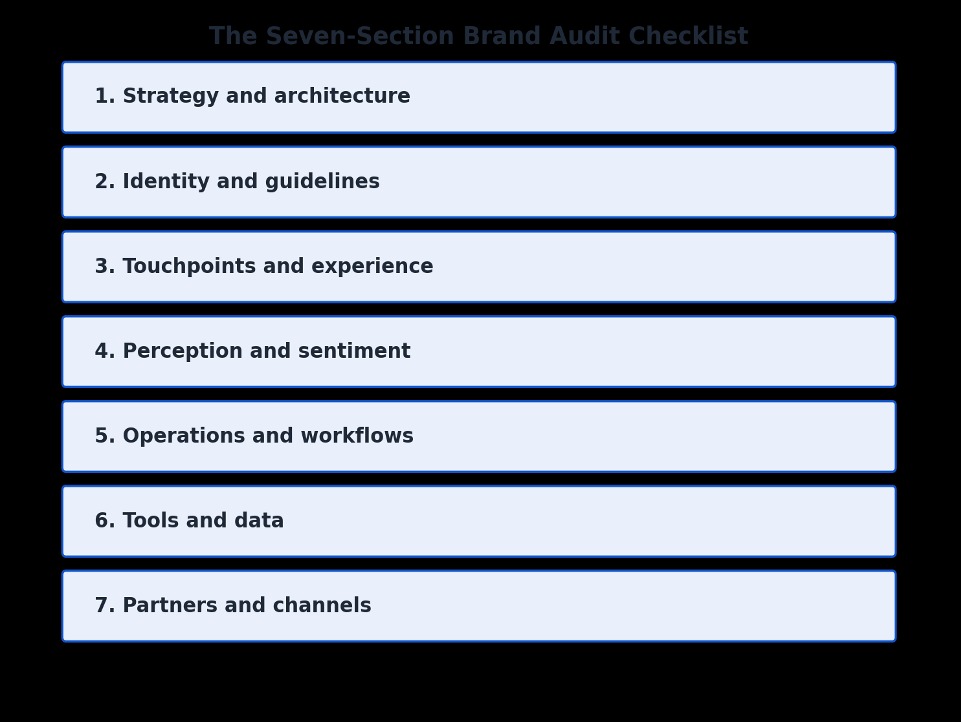
1. Strategy and architecture
Fuzzy positioning shows up in every channel. Confirm documented positioning and a defined brand hierarchy, and add a written narrative your team can quote. A missing item here usually points to a strategy update rather than a design fix.
2. Identity and guidelines
Teams drift fast when guidelines live in old files. Check whether your logo and typography rules stay current, and make sure your guidelines live somewhere searchable instead of hiding in a shared folder nobody opens twice.
3. Touchpoints and experience
A polished homepage loses value when the follow-up email feels off-brand. Review tone and visual consistency across each channel, from your website to packaging, and mark any channel that reads like a different company.
4. Perception and sentiment
Reviews and surveys age fast when nobody checks them. Verify active review monitoring and a survey cadence, and check whether intended positioning matches what customers actually say once you compare the two side by side.
5. Operations and workflows
Approval delays usually trace back to a messy request path. Review your request process and approval routing, check version control too, and confirm that outdated campaign creative gets retired on time instead of lingering in circulation.
5. Tools and data
Scattered systems make every search slower. Count how many systems hold your assets right now, check search quality and whether AI tagging keeps files findable, and make sure your DAM connects to PIM and e-commerce channels.
Suggest read: Top 15 Digital Asset Management Software in 2026
7. Partners and channels
Partner channels amplify every weak process. Confirm role-based access and localized content kits, check consistency across marketplaces, and flag any partner working from email attachments instead of an approved portal.
Want the scored version? Grab the checklist and run all seven sections with your team this week.
Brand Audit Use Cases by Team Type
The same framework leads to different roadmaps depending on how your brand operates. Three patterns show up often across brand-driven teams, house-of-brands portfolios, franchise networks, and product-heavy e-commerce catalogs.
1. Multi-brand and house-of-brands teams
Regional teams drift fast when each brand shares one crowded library. The audit usually finds fragmented storage and guidelines stuck in PDFs. Separate workspaces per brand help teams localize faster and keep the portfolio organized.
2. Franchise and partner networks
Email attachments create the loudest problems in franchise networks. The audit often points to email-based distribution and missing permissions. Curated portals with approved kits and expiring links help reduce off-brand usage at the edge of the network.
Suggest read: Brand Governance: A Complete Guide to Frameworks, Tools, and Implementation in 2026
3. E-commerce and product-heavy catalogs
Product teams lose time when channel images live in separate systems. The audit often exposes fragmented storage and weak links between the DAM and sales channels. A create-to-syndication workflow keeps imagery aligned and cuts content rework by SKU.
Suggest read: Digital Asset Management for ecommerce - Complete Guide
How BrandLife Turns Audit Findings Into Action
A slide deck alone will not change your workflow. The value shows up when each finding becomes a system your team uses every day. Here is how common findings map to features you can turn on.
Findings to features, mapped
BrandLife customers report 40% less time searching after centralizing assets. The table below pairs common audit findings with the capability that addresses them.
Common brand audit findings mapped to BrandLife capabilities and BrandLife customer-reported outcomes.
Transparent pricing that fits the roadmap
Pricing matters once the roadmap hits procurement. BrandLife Starter runs $150/month for one user, one brand, and 1GB of storage. Core DAM features, AI tagging, interactive brand guidelines, and native integrations come standard.
Native integrations include Google Drive, Dropbox, OneDrive, SharePoint, Canva, Figma, and Slack. Enterprise uses custom pricing for unlimited users and brands, plus custom storage. Advanced security and dedicated support fit larger rollouts. Add-ons like Visual Search, SSO, Asset Expiration, Asset Watermarking, and Custom Roles & Permissions let you scale as findings demand.
See current plans on the BrandLife pricing page.
Caption: BrandLife's pricing page\
Alt text: An image showing BrandLife’s pricing page
Book a demo with BrandLife and turn your audit into a working brand ops system this quarter.
Frequently Asked Questions
How often should you run a brand audit?
A yearly review keeps small issues from becoming customer-facing problems. Run the full audit once a year across strategy and operations. Add a lighter quarterly refresh of sentiment and asset usage between those reviews. Tie the cadence to major launches, so a new sub-brand or region triggers a check.
What is the difference between a brand audit and a brand refresh?
Teams waste budget when they redesign before they diagnose. An audit measures where your brand drifts from intent and produces a prioritized roadmap. A refresh applies the changes to visual identity or messaging based on what the audit found.
Can a small marketing team run a brand audit without an agency?
Small teams can run the core audit with a short, time-boxed plan. The 4-week framework and checklist give in-house teams enough structure to do the work themselves. Outside help can still pay off for deeper customer research or a full rebrand.
How do you measure the ROI of a brand audit?
ROI starts with a baseline. Track search time and approval speed. Add asset reuse and brand violation counts. Measure the same numbers again after your ship. BrandLife customers report savings such as 6+ hours saved weekly per creative, which shows how quickly operational gains can add up.
Who should be involved in a brand audit?
Cross-functional input makes the findings more useful. Start with brand and marketing ops as your core group. Bring creativity from day one. Add sales and customer service for touchpoint and perception input. Bring in IT or procurement once tooling decisions come up, so security and integration reviews happen early.