
Key Takeaways
- Brand assets are the visual and verbal elements that make a brand recognizable, think logos, colors, fonts, and product content.
- Managing them well means centralizing and governing those files so teams ship on-brand work faster.
- Scattered storage across drives and Slack creates version confusion and slow creative delivery.
- A 7-step framework covers everything from audit and guidelines to workflows and training.
- AI tagging and search cut manual metadata work when they sit on top of a solid taxonomy.
- BrandLife brings a modern DAM (Digital Asset Management) together with multi-brand workspaces and partner portals in one place.
A brand asset is any visual or verbal element that makes a brand recognizable, and managing them well means centralizing and governing those files so teams stop rebuilding work that already exists. Your creative lead searches three folders for the Fall campaign hero image, then downloads last year's version by mistake. That kind of slip points to a brand asset problem, and the cost shows up in delays, rework, and brand inconsistency.
Teams juggle more channels and more outside partners than a shared drive handles well. Scattered files slow every launch and make it harder to keep brand use consistent.
This guide defines brand assets in plain language and shows the categories that count today. It also walks through a 7-step framework for managing assets at scale, including where AI helps and how the work changes for multi-brand teams, partners, and e-commerce operators.
What Counts as a Brand Asset Today
Your team uses more than a logo file to express the brand. The groups below show the full picture, from visual identity to voice and the templates that keep work moving across channels.
1. Visual assets
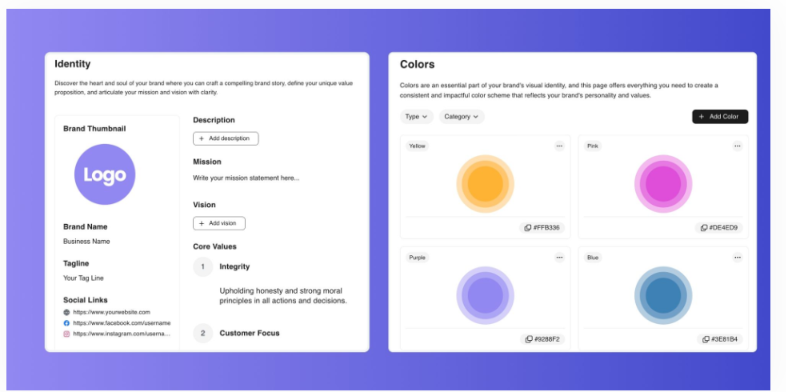
A wordmark and a fixed color palette register before anyone reads a line of copy. Those cues sit at the center of brand recognition.
Store primary and secondary logo variations, plus print and web color values. Keep raster and vector formats in the same place. Clear cues like a logo lockup or signature color do a lot of memory work, and the idea of distinctive assets helps explain why.
2. Verbal and audio assets
Off-tone copy can weaken a brand as quickly as a stretched logo. Taglines and brand voice shape how your company sounds across every channel.
Voice guidance belongs next to your visual files. Media-heavy brands may also manage jingles or sound marks, which need the same version control as any logo. A short, documented voice guide keeps writers and agencies aligned.
3. Templates, product content, and campaign files
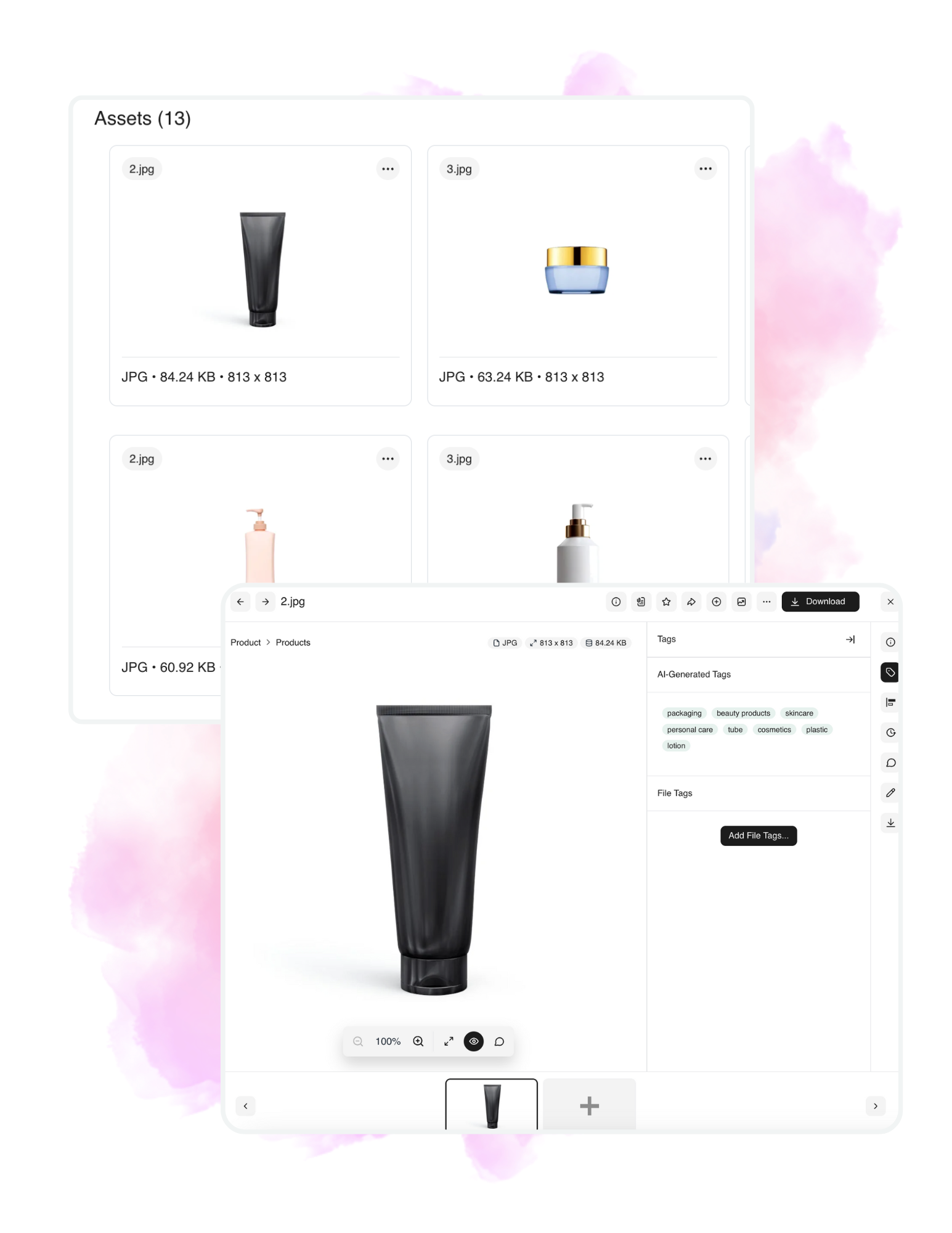
A single product can create dozens of channel variants, from marketplace images to short social cutdowns. Templates and SKU-level content keep teams shipping without rebuilding the same asset each time.
E-commerce teams feel this pressure first, because product imagery spreads across marketplaces and social channels. The useful distinction is simple: brand assets carry identity and usage rules that general files do not.
Why Brand Asset Management Pays Off
An expired stock photo on a live ad or an off-brand flyer from a local partner can undo a lot of careful work. The payoffs below are practical, brand consistency, faster production, and fewer governance slips.
1. Consistency builds recognition and trust
The same logo on your site, packaging, and sales deck makes the next impression easier to place. Repeated exposure to familiar cues helps people recognize your brand across touchpoints.
Recognition can build into trust and preference over time. Consistent execution gives your brand a steadier presence in the market, and that steadiness supports long-term brand equity.
2. Speed and cost of creative delivery
When designers spend their day answering file requests, production slows and queues grow. Time spent searching is time lost from actual creative work.
BrandLife says customers report 40% less time searching for assets, 70% fewer asset-request emails, and 6+ hours saved weekly per creative. BrandLife also says teams see 50% faster launch cycles when retrieval and approvals move faster inside one system.
3. Compliance and brand governance risk
A licensed image used past its expiry can create legal exposure. Outdated claims or co-branded files in the wrong market can do the same.
Expiration dates and version control reduce that risk by keeping retired files out of circulation. Franchise and partner distribution needs this most, because off-brand execution usually happens far from the brand team's daily view.
What Brand Asset Management Means (and How It Connects to DAM)
Many teams hear these terms in vendor demos and leave with more confusion than clarity. The difference is useful, because one term describes the process and the other describes the software underneath it.
Brand asset management is the process of centralizing and updating brand assets so teams and partners can ship compliant work quickly, while a DAM (Digital Asset Management platform) is the software layer underneath it that stores and serves the files. Many teams hear both terms in vendor demos and leave with more confusion than clarity, but the distinction is useful once you separate process from software.
Storage alone rarely solves version confusion. Brand asset management sits on top of a DAM and adds governance and brand context, so a stored file becomes an approved, usage-ready asset rather than just a file that happens to be online. That means approved templates, clear permissions, and sign-off routing that keeps every asset on-brand before it goes live.
The strongest setup links your DAM to living guidelines, with approval workflows and partner portals sitting on the same base, so the file and its usage rules stay connected. Static PDF guidelines in one tab and loose files in another push people to improvise, and improvisation is where off-brand work starts. The goal is a single source of truth where teams can find the right file and confirm how to use it, which is what the framework below builds toward.
A 7-Step Framework to Manage Brand Assets at Scale
Teams usually hit the same sequence on the way from folder chaos to a governed library. These seven steps start with an audit and move through guidelines, taxonomy, centralization, workflows, integrations, and adoption.
Step 1: Audit what you already have
Governance starts with counting if half your library lives in old folders. Inventory logos and fonts first, then move through imagery, video, templates, and product content:
- Record each asset's owner, format, usage rights, and how current the file is
- Flag duplicates and retired files
- Capture missing pieces too, such as social templates for a new sub-brand
A simple spreadsheet with location, owner, and status gives you a reusable audit checklist that shapes every step that follows.
Step 2: Define guidelines and governance
Teams make fewer judgment calls when the rules are easy to find. Document logo use and colors, then cover typography, photography style, and voice, showing what's allowed and what's off-limits with concrete examples rather than abstract principles.
Map roles and permissions next, deciding who creates and who approves work so people know where authority sits during a live project. Embed the rules into the assets themselves through notes, locked zones, or template controls, since interactive guidelines keep this living instead of trapped in a PDF that goes stale within months.
Step 3: Design taxonomy and metadata
Search works only when the structure matches how your team thinks. Group assets by campaign and product, then layer in region, audience, and media type. Standardize naming with a scalable pattern like brandname-logo-horizontal-fullcolor-emea-web, since consistent naming reduces confusion when several markets share one parent brand.
Set metadata fields for format and usage rights, then add language, market, and lifecycle stage as well. That structure powers reliable filtering and stronger AI search later.
Step 4: Centralize your storage
The question of which drive holds the right file slows everyone down, so consolidate scattered storage into one secure hub with a clear structure. Host approved versions only, and archive retired assets so they stay out of the way, managing access with role-based permissions, secure sharing, and audit trails. Done well, search-to-download can drop to seconds instead of a slow folder hunt.
Step 5: Build workflows for creation, approval, and expiry
Email chains lose context and blur accountability, so a defined path keeps production moving and keeps approvals attached to the right files. Start with the creative request and production, then move through review, approval, and distribution, keeping those steps inside the same system that stores the assets.
Comment threads and status updates on the file itself replace scattered feedback across tools, and version control keeps current files front and center for non-admin users. Track expiry dates for licensed media and time-bound campaign content, and assign ownership to brand ops or marketing ops so the review cycle has a clear home.
Step 6: Integrate with the tools work already happens in
Assets get used more when they show up inside the tools your team already opens all day, since good integrations cut context switching and speed up handoff. BrandLife connects to Canva and Figma, so designers can pull approved libraries inside the tools they already use, along with Google Drive, Dropbox, SharePoint, OneDrive, and Slack.
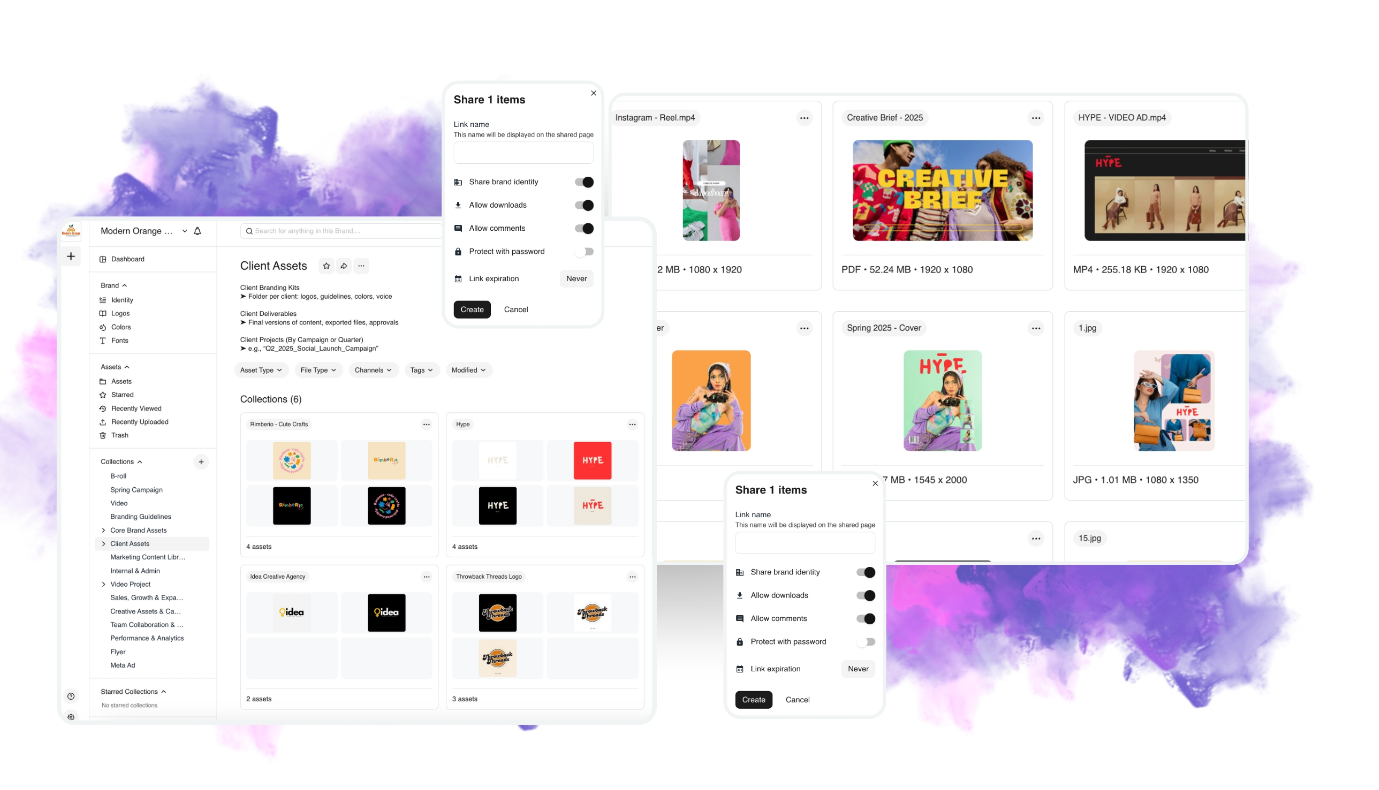
E-commerce teams benefit here directly, since keeping product imagery closer to the systems that publish it makes packaging changes and claims updates easier to manage across storefronts and marketplaces.
Step 7: Train users and measure adoption
A clean library earns value only when people know how to use it, so onboard internal teams and external partners on where to find assets and how to request new ones. Run quarterly audits to retire outdated files and refine your taxonomy, and track which assets get used and where they show up. Feed those insights back into guidelines and creative planning, since usage data tells you which templates deserve more investment and which files never earned real adoption.
Advantages of AI Fits in Brand Asset Management
A plain-language search like "summer campaign hero image for APAC" can replace a slow folder hunt with a faster self-serve path. AI helps most with tagging, retrieval, and recommendations, while people still own the brand decisions.
1. AI tagging and content recognition
Manual metadata entry breaks down as a library grows. Automated tagging by keyword, color, object, product, or campaign can reduce that upkeep.
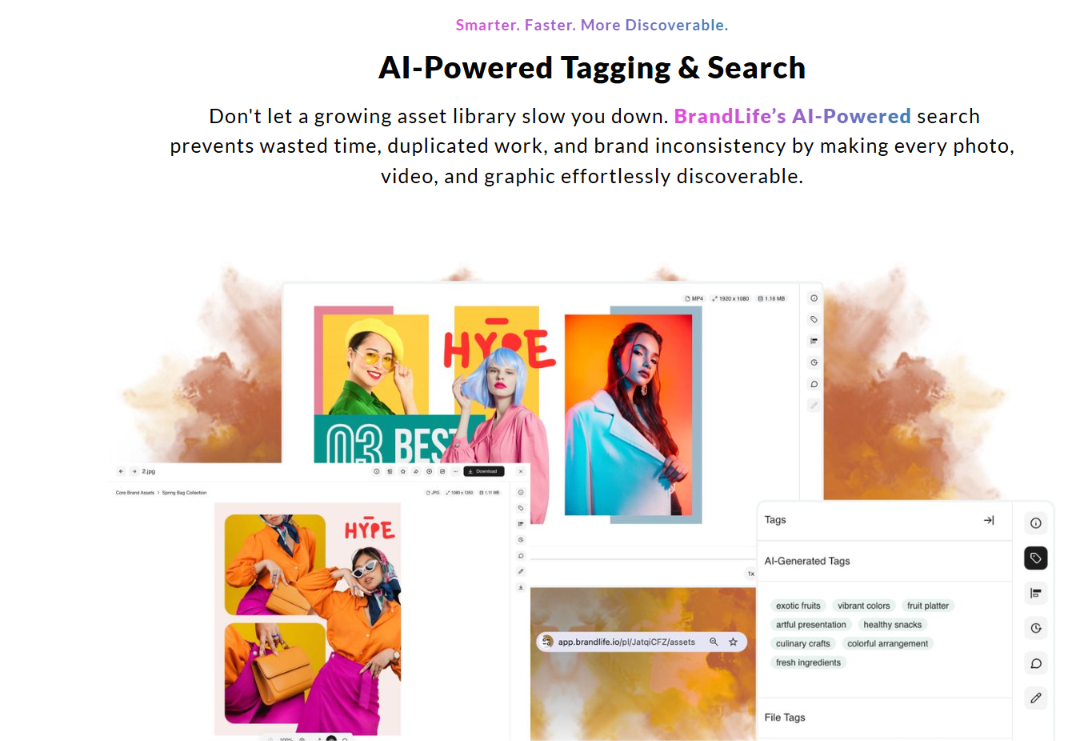
AI tags on ingest keep the library searchable without a full-time librarian. Visual search adds another route, helping users find files by similarity when they remember the look but not the name.
2. AI search and recommendations
Non-designers rarely know your file naming pattern. Plain-language search meets them where they are.
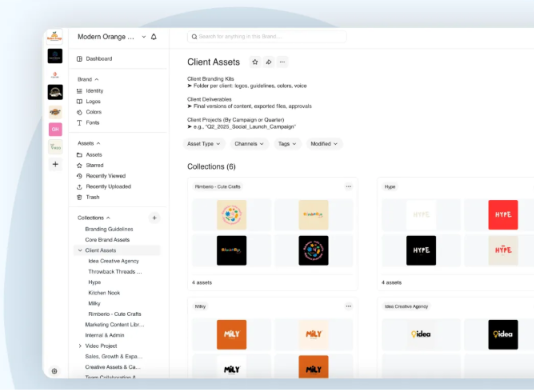
Contextual search can interpret a request like "vertical product shot for the holiday email" and return stronger matches. Related-asset suggestions help searchers find useful variants they might have missed on their own.
3. Where humans stay in charge
Messy libraries still produce messy results, even with smart search on top. AI works best as an added layer on top of strong taxonomy and governance.
Policies and approvals stay with people. AI can speed retrieval and flag likely misuse, while your brand team still makes the final call on what gets published.
How BrandLife Approaches Brand Asset Management
BrandLife maps closely to the framework above, giving teams one workspace for assets and guidelines plus purpose-built options for multi-brand teams and partners, without the cost or complexity of older DAM rollouts.
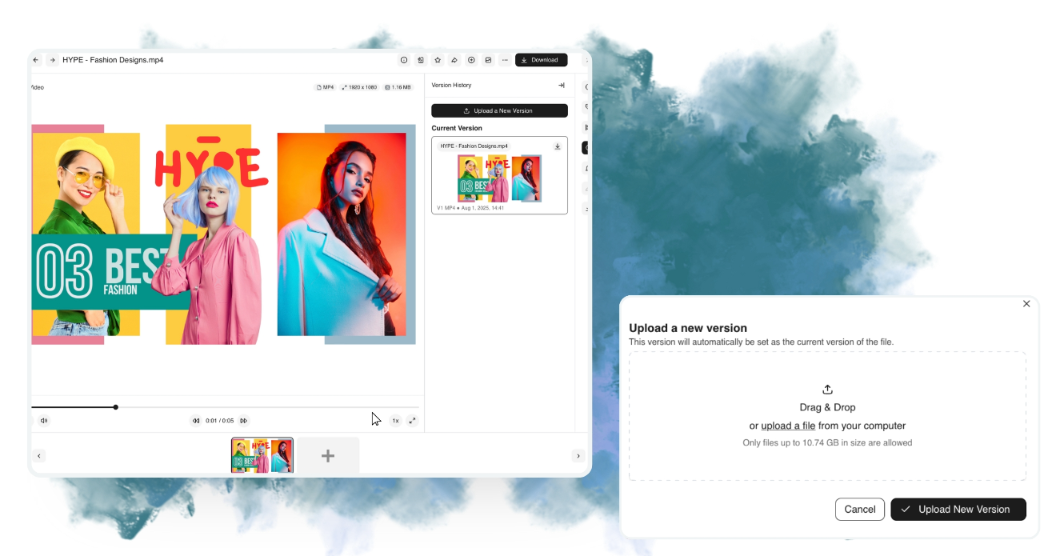
BrandLife brings a modern DAM together with approval workflows, version control, and living brand guidelines in one place. Guidelines update in place, so stale PDFs stop circulating, and asset expiration helps retired campaign creative stay retired, with the file sitting next to its usage rules.
The BrandLife demo video shows this in action, including how version control keeps a library clean and how AI tags images, videos, and documents automatically on upload.
- Each client, sub-brand, or product line can run in its own multi-brand workspace, with separate palettes, font libraries, and storage
- AI tagging and contextual search support faster retrieval, with customers reporting 40% less time searching
- Unlimited free partner portals help reduce asset-request emails by 70%
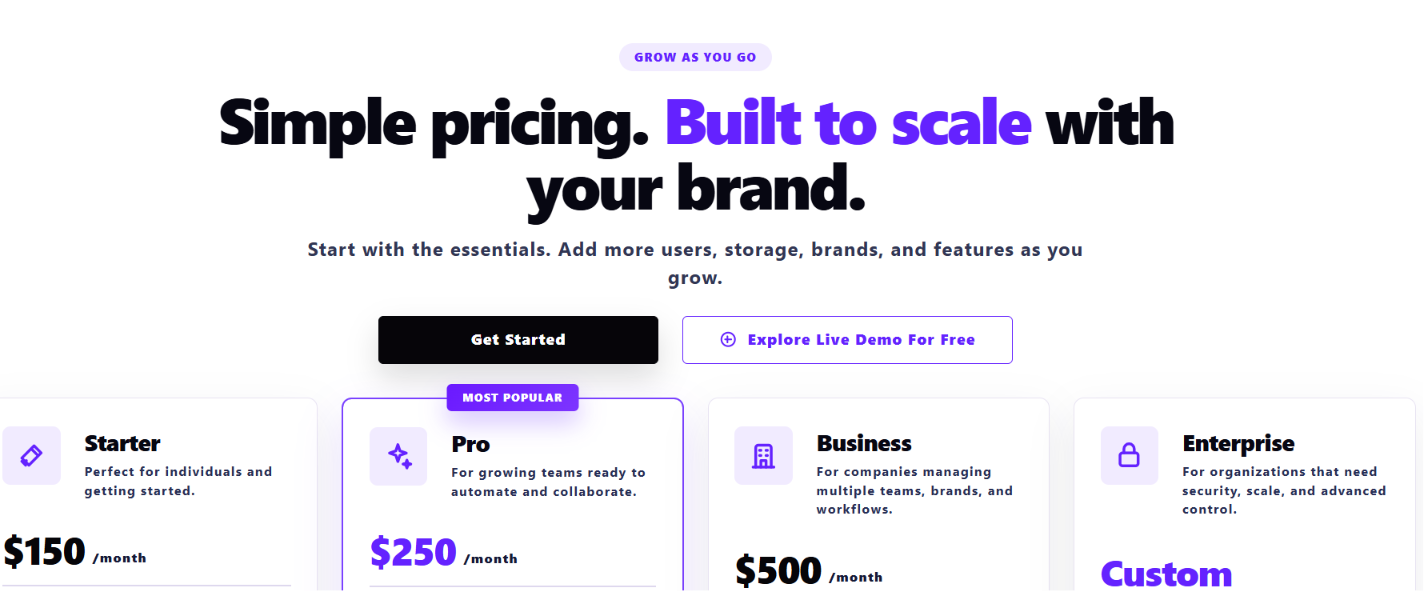
Pricing stays public instead of hiding behind a sales form. Starter is $150 per month for one user, one brand, and 1GB of storage. Enterprise uses custom pricing for unlimited users and unlimited brands, with custom storage and advanced options.
Brand assets cover more than logos. They include voice, templates, campaign files, and product content that show up across every channel your team manages, and a workable management system starts with an audit, then builds through guidelines, metadata, centralization, workflows, integrations, and training, with AI helping most once that foundation is in place.
If you want one place to organize assets and keep usage clear, Get Started with BrandLife.
Frequently Asked Questions
What is the difference between a brand asset and a brand identity?
Brand identity is the full system behind how your brand is perceived. Brand assets are the files people use to express that system, like logos, colors, voice guidance, and templates. Identity sets direction; assets carry it into daily work.
How often should you audit your brand assets?
A quarterly cadence works well for active libraries, giving your team a regular point to retire expired files and refine taxonomy. Run a fuller audit after a rebrand, major campaign, or market launch.
Who should own brand asset management in a company?
Ownership usually sits across brand ops, creative, and marketing ops, with one named admin holding final authority over permissions. Brand ops sets the rules, marketing ops manages workflow, and creative maintains the files.
Do small teams and startups need a brand asset system?
Small teams usually feel the need once asset volume or partner count creates version confusion. Shared drives can work early on, but a lightweight DAM becomes useful once you're juggling multiple campaigns or brands.
How do you keep external partners from using outdated assets?
Give partners a self-serve portal showing approved assets only. Use expiration dates for time-bound creative, and keep version control in place so franchisees, agencies, and resellers can pull the right asset without delay.