

Key Takeaways
- Digital asset management goes beyond storage. Modern digital asset management platforms like BrandLife centralize your assets, streamline workflows, and ensure teams can collaborate efficiently, while keeping brand consistency intact.
- If your team struggles with scattered files or inconsistent branding, you likely need a digital asset management solution. Common red flags include wasted hours searching for files, using outdated visuals, or missing campaign deadlines due to approval delays.
- Creative, marketing, and external teams all benefit from digital asset management. Whether it's designers managing large files, marketers executing campaigns, or partners needing controlled access, digital asset management ensures everyone stays aligned and productive.
- DAM delivers measurable ROI. Organizations using DAM report up to 80% reduction in asset search time, 25% productivity gains, and up to 434% ROI over three years—making it one of the highest-impact martech investments a brand can make.
- BrandLife helps teams move faster and stay on-brand. With AI-powered tagging, Slack and Canva integrations, automated workflows, and real-time analytics, BrandLife simplifies content management and scales with your team.
Digital asset management (DAM) is the practice of using specialized software to store, organize, tag, retrieve, and distribute digital files—such as images, videos, logos, documents, and design templates—from a single centralized platform. Unlike basic cloud storage, a DAM system adds layers of intelligence: AI-powered tagging, version control, role-based permissions, and automated workflows that transform how teams create, manage, and share brand content.
Brands are creating more content than ever before. From campaign videos and product shots to pitch decks and logos, digital assets have become the foundation of brand experience across every touchpoint.
But without a solid system, these assets often end up buried in email threads or scattered across shared drives, costing time and putting brand consistency at risk. Studies show the average knowledge worker spends 9.3 hours per week searching for information across documents, emails, and files—time that could be spent on strategy and creative execution.
That's where a digital asset management platform comes in.
Whether you're a growing brand, a creative agency, or a content-driven production house, digital asset management software helps you centralize, organize, and distribute your digital content with clarity and control.
In this guide, we'll walk through what digital asset management is, how it works, who needs it, and how to choose the right digital asset management platform for your team.
What Is Digital Asset Management?
Digital asset management—often abbreviated as DAM—refers to the tools, processes, and strategies used to store, tag, organize, retrieve, and share digital assets such as images, videos, logos, brand templates, and documents from a centralized platform. A DAM system acts as a single source of truth for every piece of brand content an organization produces.
Unlike traditional cloud storage, a digital asset management system like BrandLife goes further by enabling advanced search, version control, permissions, and automated workflows—all within a centralized platform.
Think of it this way: Google Drive or Dropbox can hold your files, but they can't tell you which version of a logo is the approved one, who last edited a campaign video, or whether a partner downloaded an expired asset. A DAM system answers all of those questions automatically—and prevents the problems that arise when it can't.
How Does Digital Asset Management Work?
A digital asset management system works by ingesting digital files into a centralized repository, automatically enriching them with metadata and AI-generated tags, and then making those assets searchable, shareable, and governable through role-based permissions and automated workflows. The typical DAM workflow follows a lifecycle that covers creation, organization, distribution, and archival.
The DAM asset lifecycle
Every digital asset moves through a predictable lifecycle inside a DAM platform:
- Creation & Ingestion: Assets are uploaded—individually or in bulk—from local drives, design tools like Figma or Adobe Creative Cloud, or directly through integrations. The DAM system captures file metadata (format, dimensions, color profile) automatically upon upload.
- Organization & Tagging: AI-powered tagging analyzes each file and assigns relevant keywords, categories, and contextual labels. Teams can supplement with custom metadata—campaign name, region, usage rights, expiration date—to make every asset findable by anyone who needs it.
- Review & Approval: Built-in workflows route assets through the right stakeholders—designer to marketing lead to legal—before they're marked as approved. Comments, annotations, and version comparisons happen inside the platform, not across scattered email threads.
- Distribution & Sharing: Approved assets can be shared via secure links, downloaded in preset formats, or pushed directly to connected channels. Role-based permissions ensure external partners only see what they're supposed to see.
- Analytics & Archival: Usage data reveals which assets are performing, which are going unused, and which need refreshing. Outdated or expired assets are archived—still accessible for reference, but removed from active workflows to keep the library clean.
When someone on the marketing team needs a product photo for a social campaign, they don't message a designer or dig through a shared drive. They search the DAM, find the latest approved version in seconds, download it in the exact dimensions they need, and move on. That's the structural difference a DAM system creates—it removes the friction that silently drains hours from every team, every week.
Digital Asset Management vs. Cloud Storage vs. CMS
Digital asset management is often confused with cloud storage solutions like Google Drive or content management systems (CMS) like WordPress, but these tools serve fundamentally different purposes. Understanding the distinction helps teams invest in the right solution for their content operations.
A CMS manages and publishes web content—blog posts, landing pages, product descriptions. A DAM manages the rich media assets that feed into those pages and every other channel your brand touches. They're complementary, not interchangeable. The most effective content operations use both: a DAM as the single source of truth for all brand assets, and a CMS to publish content that pulls from that library.
5 Benefits of Using a Digital Asset Management Platform
A digital asset management platform delivers measurable improvements across content operations—from faster asset retrieval and streamlined approvals to stronger brand governance and reduced production costs.Implementing a digital asset management platform helps teams streamline how they create, manage, and distribute content.
From accelerating production timelines to safeguarding brand identity, digital asset management adds structure, control, and visibility across every stage of the content lifecycle.
1. Centralized access
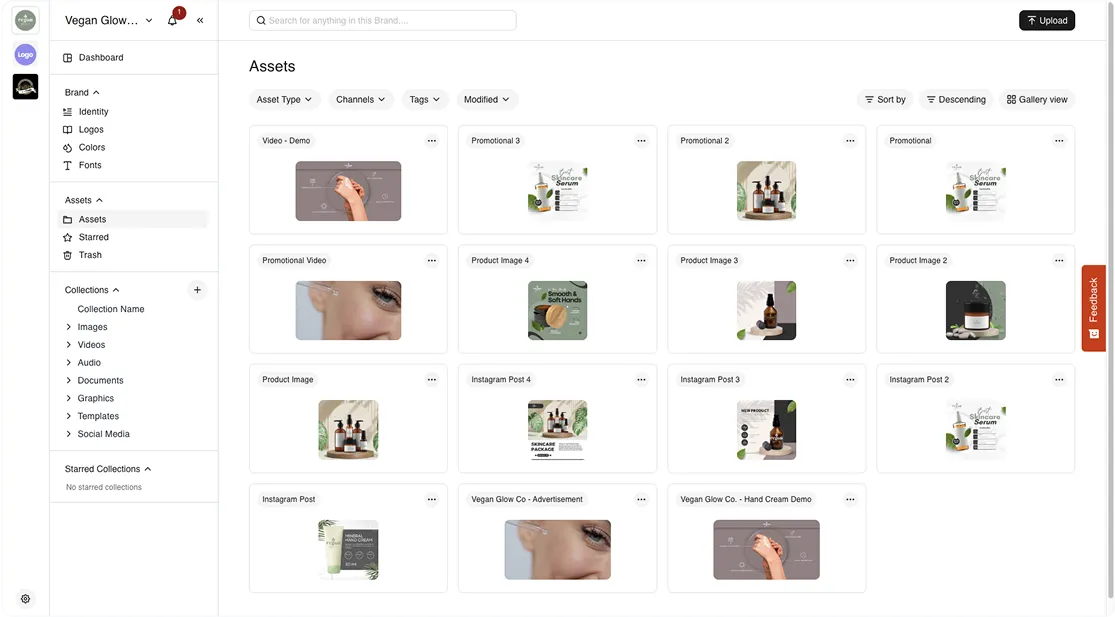
A unified asset hub means everyone—from internal teams to agencies—can instantly access the most up-to-date files, anytime, from anywhere.
BrandLife’s users report a 30% increase in productivity, thanks to reduced time spent hunting for assets. With easier access, teams can focus on high-impact creative work instead of digging through folders.
"The productivity gains from DAM are not incremental. They are structural. When marketing teams stop losing hours to asset searches and approval delays, that time goes directly into campaign output and revenue-generating work."
— José Debuchy, 40Q Agency
2. Better organization
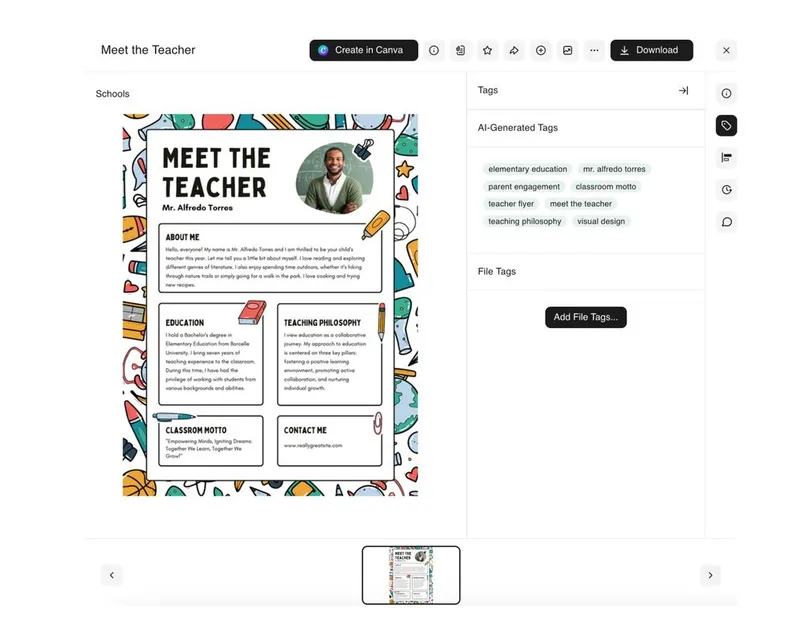
Tagging assets by campaign, type, region, or channel, rather than relying on rigid folder structures, makes repurposing content faster and easier.
A robust digital asset management solution uses AI-powered tagging and smart search that automatically analyzes files for keywords, formats, and context to generate relevant tags. This helps creative teams locate the right assets in seconds, even across large, complex libraries.
3. Improved distribution
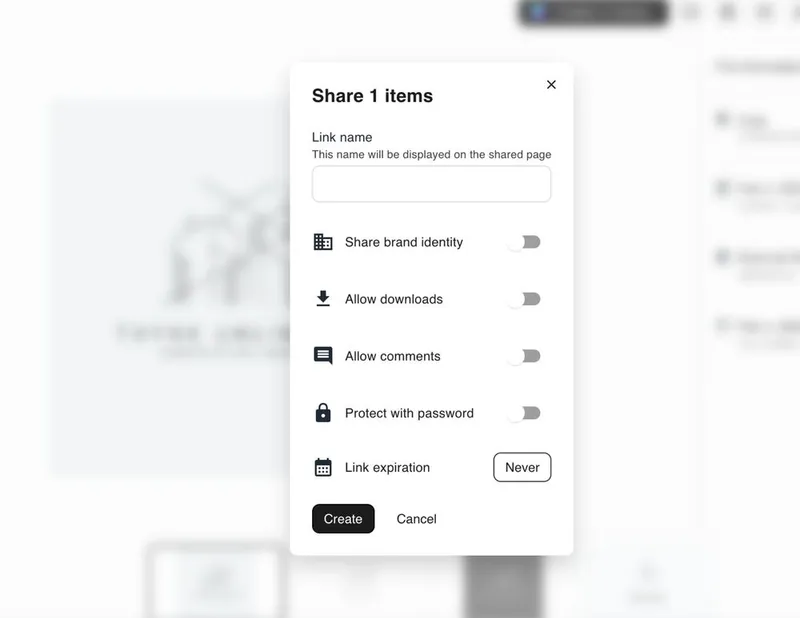
A digital asset management platform streamlines how assets are shared across teams, channels, and regions. Instead of manually resizing or emailing files, users can generate shareable links, download assets in preset formats, or publish directly to connected platforms.
With BrandLife, distribution becomes faster, more secure, and fully traceable, ensuring the right version of the asset reaches the right audience every time.
4. Maintaining brand identity

Digital asset management platforms ensure only approved, up-to-date assets are used by locking templates, setting expiration dates, and enforcing brand guidelines.
Features like version control and restricted access prevent unauthorized edits or outdated content from slipping into live campaigns, protecting brand integrity across every touchpoint.
5. Easier collaboration

A digital asset management platform streamlines teamwork by allowing users to comment, review, and approve assets in one place, reducing back-and-forth across tools.
With shared access, version history, and role-based permissions, teams and external partners stay aligned without risking duplicate work or outdated files.Check out our guide on the benefits of digital asset management for strengthening your brand.
Types of Digital Assets a DAM System Manages
A digital asset management system manages any file that holds value for an organization—from brand visuals and marketing collateral to video content, audio files, and legal documents. The scope goes far beyond photos and logos. Here's a breakdown of the most common asset types teams manage inside a DAM:
- Brand visuals: Logos, icons, brand marks, color palettes, and typography files that define visual identity
- Marketing collateral: Social media graphics, banner ads, email templates, brochures, and presentation decks
- Photography: Product shots, lifestyle imagery, headshots, event photography, and stock images
- Video content: Campaign videos, product demos, testimonial clips, raw footage, and animated assets. For teams managing large video libraries, digital asset management software for video provides specialized tools for preview, transcoding, and frame-level search.
- Audio files: Podcasts, voiceovers, sound effects, and brand audio signatures
- Documents: Brand guidelines, style guides, legal agreements, contracts, and compliance documentation
- Design source files: PSD, AI, INDD, Figma, and Sketch files that creative teams need for production
- 3D and animation assets: Renders, CAD files, and motion graphics—particularly relevant for animation studios and production houses
The average mid-market brand manages tens of thousands of digital assets across these categories. Without a DAM, these files fragment across drives, inboxes, and desktops—creating the kind of operational drag that compounds with every new campaign, product launch, or market expansion.
Does Your Organization Need a Digital Asset Management Platform?
Your organization likely needs a digital asset management platform if your team regularly wastes time searching for files, struggles with version confusion, or has experienced brand inconsistencies caused by outdated assets reaching external audiences.
How Can You Benefit From a Digital Asset Management System?
A digital asset management system benefits every team that touches brand content—creative teams gain faster file retrieval and version control, marketing departments accelerate campaign launches, and external partners receive secure, controlled access to only the assets they need.
A digital asset management system supports the entire organization, even if not everyone uses it the same way.
While teams like creative, marketing, and external partners are the heaviest users, most employees will interact with your digital asset management at some point, whether to access a brand logo, pull campaign materials, or share content with clients.
Creative teams
Designers, video editors, and content producers often work with large, high-resolution files and tight deadlines. Digital asset management for designers gives them a centralized space to upload, tag, and manage their work, so they don't waste time digging through folders or emailing files.
Furthermore, features like version control, format-specific previews, and smart tagging allow creative teams to stay focused on producing great work, not on managing assets.
Here's a useful way to think about it: if your team has fewer than 500 assets and only two or three people touch them, a shared drive might still work. But the moment you add a second brand, an external agency, a regional team, or a compliance requirement, the cracks in basic storage become structural problems. That's the inflection point where DAM stops being a nice-to-have and becomes operational infrastructure.
Marketing departments
Marketing teams frequently pull from a shared pool of content, including logos, product photos, campaign visuals, and templates, to build landing pages, social posts, ads, and more.
With digital asset management software, they can instantly access the latest approved materials, avoid using outdated assets, and stay on-brand across every digital channel.
Besides, built-in workflows streamline reviews and approvals, helping teams get campaigns to market faster.Marketing teams using DAM report saving 11 hours each week on branding initiatives, and with templating integration, those savings can increase to up to 18 hours per week.
External partners
Agencies, freelancers, distributors, and franchise partners often need selective access to brand materials.
Digital asset management software like BrandLife allows you to grant controlled and secure access to only the assets they need, without exposing internal folders or risking outdated content being shared externally.
This keeps collaboration efficient and your brand protected.
Retail and e-commerce teams
Retail brands manage enormous volumes of product imagery, seasonal campaign assets, and in-store display materials across multiple regions and channels. A single product might require dozens of image variants—different angles, lifestyle contexts, and format specifications for each marketplace or retailer.
A digital asset management platform built for retail ensures every product image, promotional banner, and seasonal asset is organized by SKU, campaign, or channel—so merchandising teams, e-commerce managers, and retail partners always pull the right asset without guesswork.
Enterprise and multi-brand organizations
When an organization manages multiple brands, sub-brands, or regional identities, the complexity of asset management multiplies. Each brand needs its own guidelines, approved assets, and access controls—but leadership still needs visibility across the entire portfolio.
A DAM platform with multi-brand workspace support—like BrandLife—lets each brand operate independently while maintaining centralized governance. This is especially critical for franchise networks, holding companies, and global organizations where brand consistency must scale across dozens or hundreds of touchpoints.
Choosing the Right Digital Asset Management Platform for Your Business
When choosing a digital asset management platform, prioritize five capabilities: built-in brand governance, AI-powered search and tagging, seamless integrations with your existing tools, automated approval workflows, and scalability that grows with your asset library without dramatic cost increases.
Once you've recognized the need for a digital asset management platform, the next step is choosing the right one for your team.
But not all digital assessment management systems are built the same. For example, platforms like Canto are often tailored for large enterprises with complex organizational structures. Some platforms are tailored for large enterprises with complex organizational structures and six-figure implementation budgets.
BrandLife is built to support small to mid-sized businesses, creative agencies managing multiple brands, and architecture firms, offering the right balance of structure, speed, and flexibility. For a detailed breakdown of what different platforms charge, the digital asset management pricing guide covers the full landscape.
Here are the key features to consider when evaluating a digital asset management solution:
- Built-in brand governance
The platform should support brand consistency at scale through approved templates, locked designs, asset usage guidelines, and permissions that prevent off-brand content from slipping through.
- Smart search & accessibility
Look for AI-powered tagging, metadata management, and keyword filters that help teams find what they need instantly, even across large libraries.
- Easy-to-use & integrates seamlessly
Your digital asset management should be intuitive enough for anyone to use, with drag-and-drop uploads, visual previews, and minimal onboarding.
It should also integrate with the tools your team already uses, like Slack, Figma, Adobe Creative Cloud, or your content management system, so that teams can manage their workflows without constantly switching platforms.
- Workflow approvals
A built-in review and approval process is essential for keeping creative operations smooth and controlled. It ensures assets go through the right checkpoints before being published or shared.
This helps eliminate back-and-forth over email, prevents unapproved or outdated content from going live, and creates a clear audit trail for feedback and sign-offs.
- Scalable for growth
Whether you're managing 1,000 files or 100,000, your digital asset management should scale alongside your brand.
Look for platforms that support unlimited users, multi-brand workspaces, and global distribution, without compromising speed or dramatically increasing costs as you grow.
For a comprehensive comparison of DAM platforms—including features, pricing tiers, and ideal use cases—explore the best digital asset management software guide.
The Role of AI in Digital Asset Management
AI is transforming digital asset management by automating the most time-consuming parts of the asset lifecycle—tagging, search, content recommendations, and even compliance checks—so teams can focus on creative strategy rather than manual file management.
Traditional DAM systems required someone to manually tag every asset with keywords, categories, and metadata. For a team uploading hundreds of files per week, that's a full-time job in itself. AI-powered DAM platforms like BrandLife eliminate that bottleneck by automatically analyzing each file—recognizing objects, text, colors, faces, and even brand elements—and generating relevant tags the moment an asset is uploaded.
But AI in DAM goes beyond tagging. Here's where it's making the biggest impact:
- Smart search: Instead of requiring exact keyword matches, AI-powered search understands context and intent. A search for "summer campaign outdoor" surfaces relevant lifestyle photos even if those exact words weren't in the file name.
- Duplicate detection: AI identifies near-duplicate files and flags them before your library becomes cluttered with redundant versions of the same asset.
- Content recommendations: Based on usage patterns and campaign context, AI can suggest assets that are likely to perform well—helping marketers make faster, data-informed creative decisions.
- Automated compliance: AI can flag assets that are missing usage rights, approaching expiration dates, or that don't meet brand guideline specifications—catching issues before they become problems.
The practical result? Teams that used to spend the first 30 minutes of every project hunting for the right file now spend that time actually working on the project. That's not a marginal improvement—it's a fundamental shift in how creative operations run.
6 Best Practices for Using Digital Asset Management
Implementing a digital asset management process is just the start. However, getting long-term value depends on how you use it.
Here are a few best practices to help your team get the most out of your digital asset management platform:
1. Standardize file naming
Create a consistent file naming system that includes key details like project name, asset type, date, and version. This improves searchability and helps teams quickly identify the right asset, reducing confusion and duplication.
A practical naming convention might follow this pattern: [Brand]_[Campaign]_[AssetType]_[Version]—for example, BrandLife_Q3Launch_SocialBanner_v2. When every team member follows the same structure, even manual searches become dramatically faster.
2. Use metadata and tagging strategically
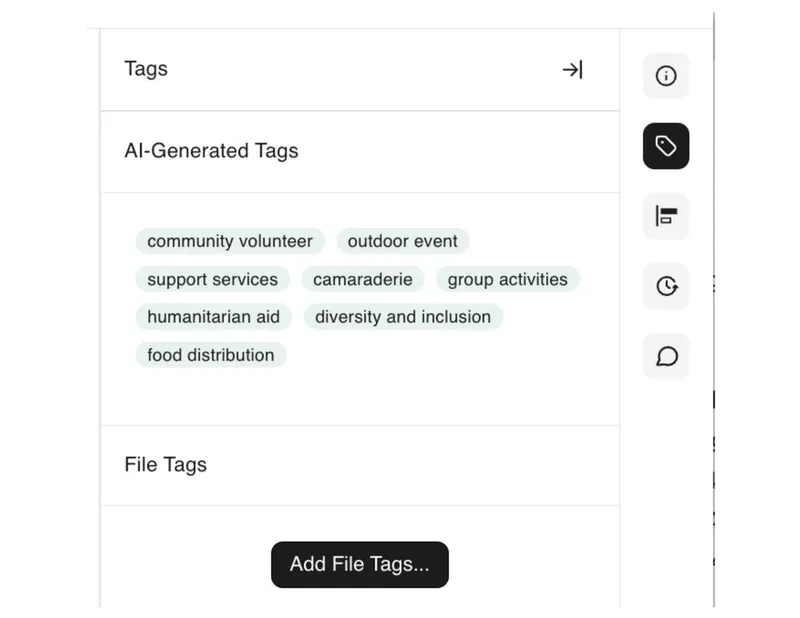
The key is building a taxonomy that reflects how your team actually searches for assets, not how your folder structure happens to be organized. If marketers search by campaign name and designers search by file type, your tagging system needs to support both pathways. For a deeper dive into metadata strategy, explore the guide on DAM metadata search that actually works.
3. Define user roles and permissions
Not everyone needs full access to everything. Assign role-based permissions to control who can view, upload, edit, or approve assets.
This prevents accidental edits, protects sensitive content, and keeps workflows organized. Let’s say,
- Designers can upload and tag new assets.
- Marketing managers can edit and approve content.
- External partners can view and download only finalized, brand-approved files.
4. Organize by usage, not just folder
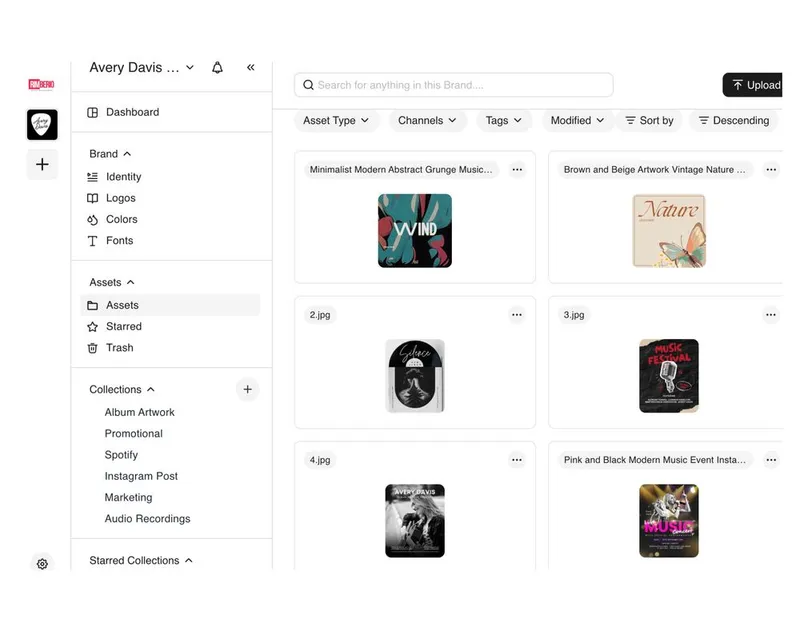
Structure your library around how assets are used—by campaign, product line, channel, or geography—rather than just traditional folders.
This makes it easier for teams to locate and repurpose assets quickly. For instance, you can create collections or smart albums like “Q3 Campaigns > Social Ads”, “Retail > In-Store Displays”, or “Product Launches > US.”
This will enable users to find what they need based on context, not just file names.
5. Set up approval workflows
Establish multi-stage review workflows to ensure every asset goes through the right checks before it’s published or shared. This safeguards brand consistency, maintains quality, and reduces the risk of errors.
A typical approval flow might look like:
Designer → Marketing Lead → Legal (if needed) → Final Approver
Each stage can include comments, version tracking, and status updates to keep feedback organized and actionable.
6. Regularly audit and archive
Over time, your digital asset management platform can become cluttered with outdated, duplicate, or unused assets.
Set up regular audits to identify what’s no longer relevant and move it to an archive. Archived assets remain accessible for reference but are hidden from daily workflows to reduce clutter.
This keeps your library clean, organized, and easier to navigate.
A good cadence is quarterly audits for high-volume libraries and semi-annual reviews for smaller teams. During each audit, check for assets with expired usage rights, campaigns that have concluded, and files that haven't been accessed in over six months. The goal isn't to delete everything—it's to ensure your active library only contains assets that are current, approved, and ready to use.
How Much Does Digital Asset Management Cost?
Digital asset management pricing varies widely based on the platform, number of users, storage capacity, and feature set—ranging from free tiers for small teams to enterprise plans that can exceed $1,000 per month. Understanding the pricing landscape helps teams budget appropriately and avoid overpaying for features they don't need.
Most DAM platforms use one of three pricing models:
- Per-user pricing: You pay based on the number of team members who access the platform. This works for small teams but can become expensive as adoption grows across departments and external partners.
- Storage-based pricing: Costs scale with the volume of assets stored. This model suits teams with smaller libraries but penalizes organizations with large video or photography collections.
- Flat-rate or unlimited-user pricing: A fixed monthly or annual fee regardless of how many people use the platform. BrandLife uses this approach because DAM value increases with adoption—the more people who can access and use approved assets, the stronger brand consistency becomes.
Enterprises that invest in DAM achieve up to 434% ROI over three years, with 25% productivity gains and up to 90% reduction in asset management time—which means the cost of a DAM platform is typically recovered within the first year through time savings alone.
For a detailed breakdown of what different platforms charge and what's included at each tier, the digital asset management pricing guide covers the full landscape.
SaaS DAM vs. On-Premise DAM: Which Is Right for You?
SaaS (cloud-based) DAM platforms are hosted by the vendor and accessed via browser, offering faster deployment, automatic updates, and lower upfront costs. On-premise DAM systems are installed on your own servers, providing greater control over data but requiring significant IT resources for maintenance and upgrades.
For most small to mid-sized businesses, creative agencies, and growing brands, SaaS DAM is the clear choice. Here's why:
- Deployment speed: SaaS platforms like BrandLife can be set up in hours, not months. There's no server provisioning, no IT project plan—just sign up, configure your workspace, and start uploading.
- Automatic updates: New features, security patches, and performance improvements roll out continuously without requiring downtime or manual intervention from your team.
- Remote accessibility: Cloud-based DAM works from anywhere—critical for distributed teams, remote designers, and external partners who need asset access without VPN headaches.
- Predictable costs: Subscription pricing means no surprise infrastructure expenses. You know exactly what you're paying each month.
On-premise DAM still makes sense for organizations with strict data sovereignty requirements—government agencies, healthcare systems, or financial institutions where regulatory compliance mandates that data never leaves internal infrastructure. But for the vast majority of brands, SaaS DAM delivers the same capabilities with a fraction of the operational overhead.
Open Source DAM: Is It Worth Considering?
Open source digital asset management platforms offer the appeal of zero licensing costs and full customization control. But that flexibility comes with trade-offs that many teams underestimate.
With open source DAM, your team (or a hired developer) is responsible for installation, configuration, hosting, security updates, and ongoing maintenance. There's no vendor support team to call when something breaks at 2 AM before a campaign launch. Features like AI-powered tagging, automated workflows, and native integrations with tools like Slack or Canva—which come standard in platforms like BrandLife—often require custom development in open source alternatives.
For organizations with dedicated development teams and highly specific requirements, open source can work. For everyone else, the total cost of ownership—factoring in developer time, hosting, and lost productivity—often exceeds what a purpose-built SaaS DAM would cost. The open source digital asset management guide breaks down the full comparison.
How Businesses Are Using BrandLife to Streamline Brand Management
The marketing team at the ABARA Marketing Group, a growing mid-sized agency, used to spend hours sifting through cloud folders and local drives to locate campaign assets.
With images, videos, and collateral scattered across platforms, finding the right file often meant missed deadlines and frustrated team members.
Brand consistency also took a hit—outdated logos and incorrect visuals occasionally slipped through, creating confusion across channels and weakening their brand presence.
These results aren't unusual. When teams stop treating asset management as an afterthought and start treating it as infrastructure, the downstream effects—faster launches, fewer brand mistakes, less creative burnout—compound quickly. The ABARA team's experience mirrors what organizations across industries discover once they move from scattered storage to a purpose-built DAM platform.
The Bottom Line
As content demands grow, managing digital assets effectively is no longer optional. It’s essential for scaling online presence, maintaining branding consistency, and moving faster as a team.
A digital asset management platform helps you move from chaos to clarity by centralizing your content, streamlining collaboration, and protecting your brand across every touchpoint.
Here's how BrandLife’s intuitive digital asset management solution helps you with effective digital asset management:
Centralized asset hub

All your brand assets—photos, videos, decks, templates—are stored in one place, searchable and accessible from anywhere.
This eliminates time lost digging through folders or chasing down files, so teams can move faster and stay aligned.
Automated workflows
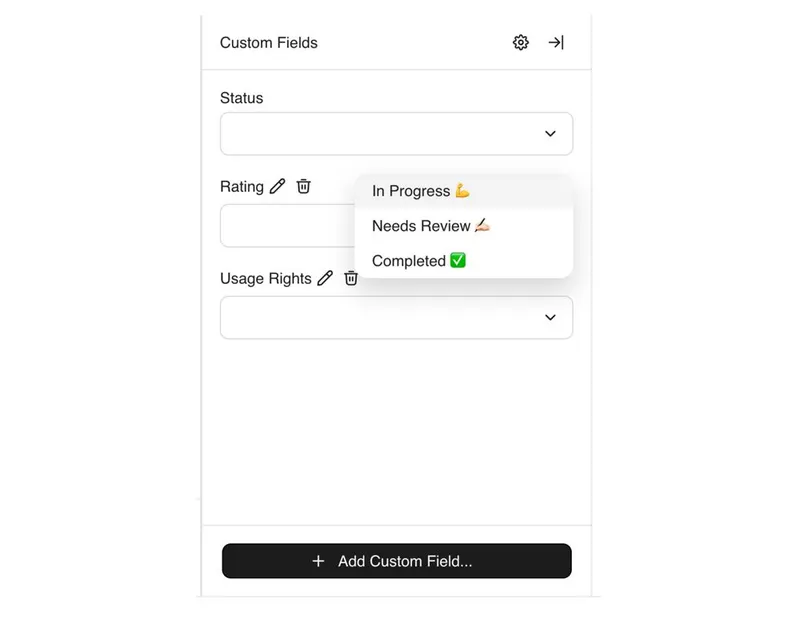
BrandLife’s built-in automated workflows simplify asset reviews and approvals across teams. You can assign tasks, set approval stages, and receive real-time status updates—all within the platform.
This eliminates manual follow-ups, keeps projects moving, and ensures every asset is signed off before it goes live.
Communication on a single platform

Seamless integrations with Slack, Canva, and other collaboration tools allow your team to stay in sync, give feedback, and share updates without switching tools.
It keeps creative conversations tied to the assets themselves, speeding up collaboration and reducing context switching.
Real-time analytics
Track how assets are being used, what’s performing, and who’s accessing what, so you can optimize both content and team efficiency.
These insights help you make data-driven decisions, cut down on unused content, and invest where it counts.
Ready to bring order to your brand’s creative operations? Discover how BrandLife can transform the way your team works—streamlining workflows and improving collaboration.Book a Demo
To understand the importance of digital asset management, read our guide.