.jpg)
Key Takeaways
- Media asset management (MAM) is the system and process for organizing, storing, retrieving, and distributing high-volume media, especially video and audio, across the full asset lifecycle.
- MAM grew out of film and broadcast work, where large time-based files need structured ingest and rights control.
- DAM is the broader category for brand and marketing content. MAM is the media-heavy layer inside it. Brand teams usually need governance and reuse across teams and partners, plus strong media handling.
- When evaluating tools, weigh metadata quality and workflow automation. Also check rights control and role-based permissions. AI enrichment and multi-brand support round out the list.
- Watch hidden costs like migration and storage overage. Seat scaling and manual tagging labor add up too.
- BrandLife brings modern DAM and multi-brand workspaces into one workspace. AI-powered search and brand portals come with transparent pricing.
Your video team just re-exported a 4K hero cut because the approved version sat buried three folders deep in a shared drive. That kind of miss burns hours and can push a launch.
Marketing and creative teams handle more video and rich media across more channels every quarter. File chaos slows launches and puts off-brand assets in front of partners. When the wrong cut ships, the fix gets expensive fast.
This guide gives you a plain-language definition of MAM. You'll see how it differs from digital asset management and why shared drives break down at scale. You'll also learn which capabilities and costs are important when you choose a tool.
What is Media Asset Management
Media asset management is a system for organizing, tracking, and distributing large media files throughout their lifecycle. A single campaign folder can hold raw clips, review cuts, channel-specific exports, and archived versions. Finding the right file quickly is only part of the challenge. Teams also need to know which version is approved, who can access it, and where it should be published. That's the role media asset management is designed to fill.
Media asset management covers the tools and processes for organizing, storing, retrieving, and distributing media assets, especially video and rich media. Category definitions from the AWS guide and other source pages frame it that way. MAM keeps large media files structured and searchable across their lifecycle.
Where Did Media Asset Management Come From
Broadcast and film teams had huge libraries of footage that had to be logged, edited, and archived. Manual systems cracked under that volume.
Media Asset Management (MAM) emerged to solve that problem. It brought lifecycle control and structured metadata to large, time-based files. Instead of relying on manual naming conventions and folder hierarchies, teams could search, track, and manage assets throughout production and distribution.
What Media Asset Management manages across the lifecycle
A single video asset moves through many hands before it reaches a channel. MAM tracks each step so every file stays accounted for.
The lifecycle runs from ingest and metadata assignment through review and versioning. It ends with distribution and archive. MAM works as a workflow system with lifecycle controls. Plain storage buckets only hold files. That distinction matters when you compare tools, because storage alone leaves your team hunting through folders late at night.
Storage keeps files safe, but MAM keeps them usable. By connecting metadata, approvals, version history, and distribution into one workflow, teams spend less time searching and more time producing content.
How Does Media Asset Management Differ from Digital Asset Management
Brand teams usually ask one practical question: do we need a media tool or a brand tool? The answer depends on what you store and who touches it.
Media Asset Management centers on video and audio, used mostly by production and creative teams. Digital Asset Management (DAM) covers a broader brand library, from logos to sales decks, used by marketing teams and outside partners. The comparison guide draws the same line. One category optimizes for media handling. The other focuses on brand governance and reuse.
Side-by-side comparison of MAM vs DAM
How MAM and DAM differ across assets, users, and use cases.
Brand governance and Reuse
Few brand teams run a broadcast studio. They run campaigns, and they need approved assets in the right hands across every channel.
The useful question shifts from pure media storage to marketing and brand management. Ask which platform supports brand guidelines and cross-functional publishing without extra overhead. Brand and marketing teams usually need a modern DAM with strong media handling more than a pure broadcast MAM. That setup keeps video searchable and keeps your brand consistent across teams and partners.
For most marketing organizations, governance matters just as much as media storage. Brand portals, approval workflows, and centralized guidelines ensure every internal team and external partner uses the latest approved assets without creating duplicate libraries.
Challenges with Shared Drives and Static Tools
Many organizations don't invest in MAM because their current system appears to work, until their content library grows. As media volume increases, shared drives and static documentation become difficult to manage, leading to version confusion, slower collaboration, and rising operational costs. This section explores the most common breaking points.
The shared-drive tipping point
Once a library fills with full-res masters, proxies, and channel variants, folder structures stop scaling. Timecode notes end up in a separate spreadsheet that drifts from reality.
Duplicate exports pile up because two editors save the same cut under different names. The workflow guide describes this as the moment manual organization gives way to real workflow tooling. Your team spends more time confirming which file is current than shipping it.
Suggest read: BrandLife’s shared drives.
Static brand guidelines and version confusion
A regional partner grabs last quarter's logo from an old email and drops it on a live campaign. That single slip creates the wrong-logo problem every brand manager knows.
Static PDF guidelines make it worse. They go stale fast, and confirming which version a partner opened takes detective work. When rules live apart from the assets, compliance turns into guesswork.
Legacy DAM cost and complexity
Many enterprise DAM contracts start in the thousands of dollars per month, before migration and training. Onboarding can stretch across months, and pricing often sits behind a contact-sales form.
Seat-based models add friction too. Each new collaborator can raise the bill, so teams ration access and keep partners on email.
Transparent pricing makes those trade-offs easier to budget. Teams can see plan costs, storage, and add-ons up front. Pricing transparency also makes it easier to forecast long-term costs as teams grow. Instead of budgeting around hidden implementation fees or unpredictable seat expansion, organizations can plan adoption based on expected usage and storage needs.
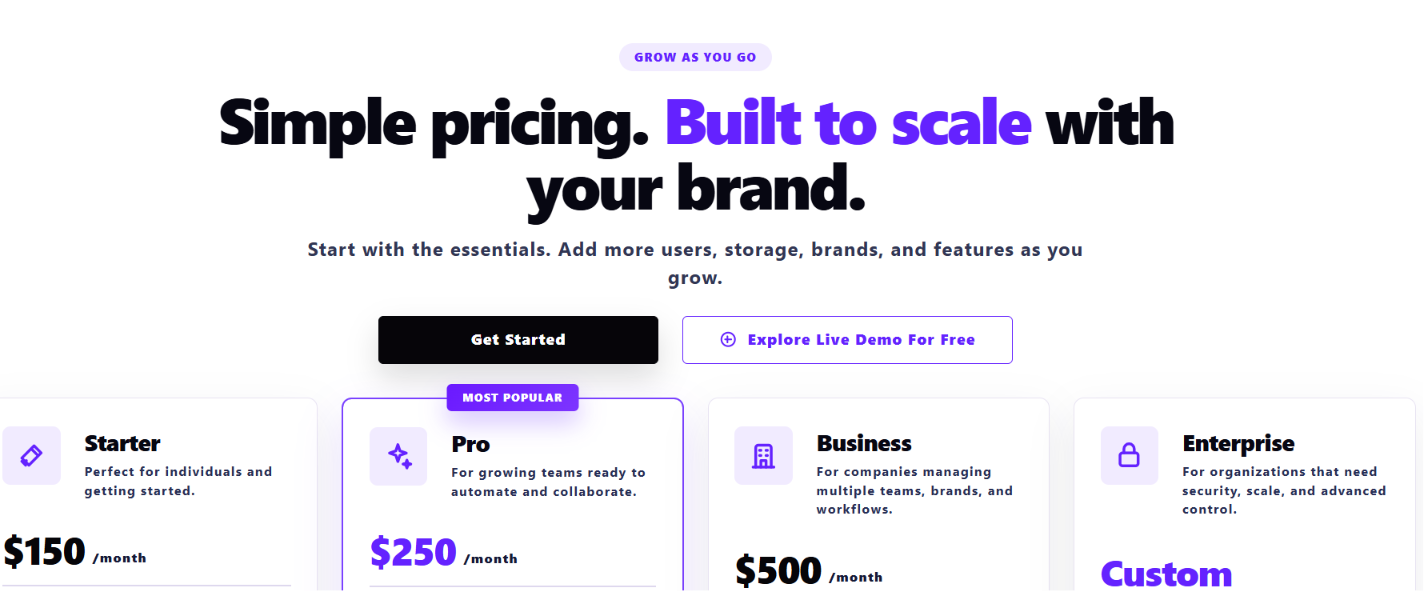
Caption: BrandLife's pricing page at glance\
Alt text: An image showing BrandLife’s pricing page
Capabilities to Look For in a Media Platform
Not every media management platform offers the same depth of functionality. Beyond basic storage, the right solution should improve discoverability, automate workflows, protect assets, and scale with your organization. These are the capabilities that have the biggest impact on day-to-day operations.
1. Metadata and search quality
A creative who spends 45 minutes hunting for one approved clip costs your team real time over a year. Strong search gives that time back.
Check whether users can find assets by project and campaign. Rights status and usage context matter just as much. Good metadata turns a media library into a resource people trust.
2. Workflow automation
Approval chains buried in email threads slow launches by days. A platform that routes ingest, review automatically and enables team collaboration keeps work moving.

When a cut clears approval, it should move straight to the right channel or portal. That kind of routing helps teams launch faster and keeps status visible for everyone involved.
Automated workflows reduce manual handoffs, eliminate approval bottlenecks, and give everyone visibility into an asset's status. That becomes increasingly valuable as content volume and stakeholder involvement grow.
3. Rights and permissions control
A single expired talent release on a reused clip can create a legal headache. Digital rights-aware distribution helps catch that early.
Role-based access keeps internal teams and outside collaborators in the right lane. Each group sees only what they're cleared to use.
Strong permissions also reduce the risk of unauthorized edits, expired licensed content, or accidental sharing with external users. As more teams and agencies collaborate on campaigns, access control becomes a core governance feature rather than just a security setting.
4. Multi-brand support
An agency managing client brands feels this first. Clean separation keeps one account's assets and guidelines from bleeding into another.
Look for separate workspaces with their own color palettes and font libraries. Asset storage should stay separate too. Localized portals extend that control to regional teams and product lines. Each brand stays distinct inside one platform.
5. AI enrichment
Manual tagging eats hours that skilled creatives should spend making things. AI search and auto-tagging can cut a big share of that labor.

Look for transcription, object detection, and duplicate detection when possible. Visual search helps people find similar assets when a file name slips their mind.
Better metadata also improves every downstream workflow, from search and recommendations to rights management and reporting, making AI enrichment valuable well beyond faster tagging.
6. Integrations and scalability
Your team already works in Figma and Canva. A good platform keeps approved media close to those tools.
Native connections to creative apps like Figma and Canva keep media in sync. Scalability means storage, users, and usage can grow with you. The MAM guide stresses this for video-heavy libraries, where file volume rises quickly.
As organizations adopt more creative tools and produce larger media libraries, integrations prevent content silos while scalable infrastructure ensures performance doesn't decline as assets, users, and workflows increase.
Implementation Considerations and Hidden Costs
Software pricing tells only part of the story. Implementation, migration, governance, and ongoing maintenance often determine the true cost of adopting a media management platform. Understanding these factors early helps teams budget realistically and avoid unexpected expenses after deployment.
1. Migration and taxonomy setup
Moving years of scattered media into a new system is the step teams underestimate most. Taxonomy design comes first, because a messy structure keeps causing problems after migration.
Budget time for content cleanup and bulk ingestion. Training rounds it out, since adoption stalls until people get comfortable. Modern platforms can shorten this work, though the project still needs planning.
Investing time in taxonomy upfront pays off long after migration. A consistent metadata structure improves search quality, reporting, permissions, and automation, making the platform easier to use as the library grows.
2. Storage overage for video-heavy libraries
4K masters and multi-track project files consume storage fast. Video libraries hit storage limits sooner than image collections.
Expandable storage matters here. A plan that lets you add capacity as you grow beats a fixed cap that forces an upgrade in the middle of a project.
3. Seat scaling and metadata labor
Costs climb when each new collaborator triggers another seat charge. Sales teams, freelancers, and regional partners all need access.
Manual tagging carries an ongoing cost too. Someone has to keep metadata current, or search quality fades. AI enrichment shifts a lot of that work off your team's plate.
4. Ongoing governance
Retired campaign assets keep circulating until a control removes them. Rights updates and archive maintenance keep the library accurate over time.
Periodic reviews catch outdated creative before a partner reuses it. Asset expiration can handle part of that work automatically by pulling stale files out of rotation on schedule.
Governance isn't a one-time implementation task. Regular audits, metadata maintenance, and lifecycle policies help ensure the library remains accurate, compliant, and useful over time.
Where Does Media Asset Management Fit by Team
The value of MAM varies depending on how each department creates, manages, and distributes content. Marketing, creative, and partner-facing teams all rely on media assets differently, so their workflows and priorities are not the same.
1. Marketing and brand ops
BrandLife customers report 50% faster launch cycles when approved media and workflows live in one place. Centralized assets and clean metadata remove the back-and-forth that stalls campaigns.
Workflow automation routes each asset from review to publish and cuts the email chain. Your brand ops lead spends less time policing usage and more time planning the next launch.
2. Creative and design ops
Designers who skip the file hunt get more making time back. Review threads and version control keep feedback attached to the right asset instead of scattered across inboxes.
Native Figma and Canva integrations pull approved media straight into the tools your team already opens. Fast retrieval means the work starts sooner. Centralized assets also reduce duplicate work because designers can reuse approved files instead of recreating them. That consistency improves production speed while helping maintain brand standards across campaigns.
3. Partner, franchise, and e-commerce teams
A franchise coordinator managing hundreds of locations needs one place to hand out approved assets. Rights-aware portals distribute current media to franchisees and resellers with controls built in.
E-commerce teams get consistent product media ready for syndication across Amazon and Shopify. Every listing pulls from the same source, so product photography stays on-brand everywhere.
Centralized distribution also reduces the need for email requests and manual file sharing. Partners can access the latest approved assets whenever they need them, improving consistency across every market and sales channel.
Why Choose BrandLife
MAM organizes and distributes high-volume media across its lifecycle, and DAM covers the broader brand library. For brand teams, governance and reuse across teams and partners usually matter more than a pure broadcast MAM. The deciding factor is whether one platform can keep video searchable and your brand consistent.
The right platform cuts search time and speeds launches. It also reduces asset-request emails while keeping partner distribution brand-safe. BrandLife brings a modern DAM together with multi-brand workspaces and AI-powered search. Interactive brand guidelines and free partner portals round it out at transparent pricing. Teams outgrowing shared drives can start on the Starter plan at $150/month and expand as they grow.
Get Started with BrandLife and see how it keeps brand assets and guidelines in one workspace.
Frequently Asked Questions
Is MAM a subcategory of DAM or a separate product?
Vendor guides usually place MAM inside DAM, as a media-focused branch built for video and audio workflows. A pure MAM shines in broadcast and production settings with large libraries of footage. Brand and marketing teams often get the coverage they need from a modern DAM with strong media handling. It keeps video searchable while also managing logos, decks, and guidelines.
What file types does media asset management usually handle?
Video and audio fill most MAM libraries. Native project files from editing suites can live there too. Many teams also store large rich-media files that are harder to manage in shared drives. To keep review work moving, many MAM tools generate proxies. These lighter preview copies help teams browse footage quickly, then pull the full-res master when they need it.
How long does a MAM or DAM rollout typically take?
Rollout length depends on library size and how messy current storage feels. Taxonomy design comes first, then content cleanup and bulk migration. User training follows. A tidy library with clear naming moves faster than years of scattered folders. Modern platforms can shorten setup with AI tagging and templated structures. Larger migrations take longer when teams need custom metadata, cleanup, and training.
Do small teams need MAM, or is a DAM enough?
Small teams usually get more value from a modern DAM. It fits many organizations from 10 to 1,000 people, and it manages video alongside the rest of the brand library. As video volume climbs, teams can add media-specific features like proxy previews and richer metadata. Sustained, high-volume production is usually the point where heavier media tooling makes sense.
How does AI change media asset management?
AI can remove a big share of manual tagging. Auto-tagging labels assets by object and color on ingest, so files arrive more searchable. Transcription makes spoken audio searchable, and visual search helps people find similar assets quickly. Those features cut metadata upkeep and speed retrieval, which gives creative teams more time back for the work that matters.