
Key Takeaways
- Marketing assets are reusable brand resources. They include logos, images, videos, templates, webpages, product content, and brand guidelines.
- Marketing asset management covers the full asset lifecycle. It connects creation and approval with organization, distribution, reuse, and retirement.
- Software becomes useful when folders stop providing enough control. Search, permissions, version history, approvals, and partner portals help teams use the right asset faster.
Your campaign launches tomorrow, but the approved product image is buried in a shared drive. Sales has an older deck. Your agency is waiting for feedback in an email thread.
The problem isn’t a lack of marketing assets. It’s that nobody can find, approve, or distribute the right version with confidence.
This guide explains what marketing assets are, how they differ from marketing collateral, and how to manage them as your content library grows. It also covers the workflow and software features that help teams move beyond scattered folders.
What are marketing assets?
Marketing assets are resources a company owns or controls to represent its brand, communicate with customers, and support growth. They can be visual files, written content, templates, webpages, videos, or internal brand resources.
Some assets support one campaign. Others stay useful for years. A product photograph might appear on a website, in retailer listings, and across paid social campaigns. A logo or messaging guide may shape thousands of customer touchpoints.
That reuse makes marketing assets valuable. It also makes them harder to manage as the library grows.
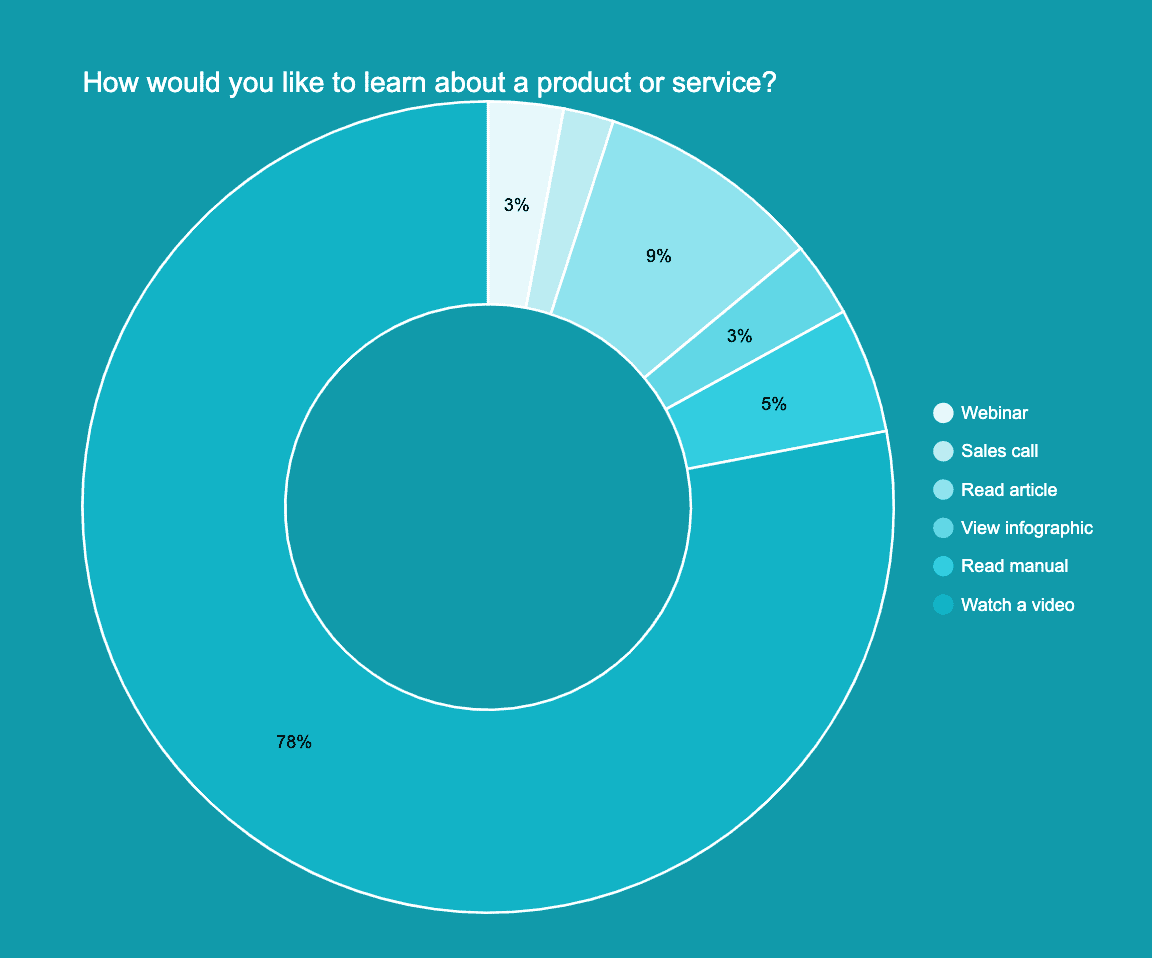
For instance, short-form videos on social media have become essential assets for discovery and engagement, with 78% of people preferring to learn about new products through short video formats in 2025.
Marketing assets vs. marketing collateral
Marketing assets and marketing collateral overlap, but they aren’t identical.
Marketing assets are the building blocks of your brand and campaigns. Examples include logos, product images, video clips, copy blocks, and design templates.
Marketing collateral is a finished piece created for a specific audience or purpose. Sales decks, brochures, case studies, and campaign landing pages are common examples.
A logo, approved product image, and testimonial quote are assets. A sales one-pager that combines them is collateral.
The distinction matters when you organize your library. Foundational assets often need wider reuse and tighter version control. Finished collateral may need campaign dates, audience labels, or expiration rules.
Types and examples of marketing assets
A useful asset library reflects how your team works. It should help people find content by purpose, channel, campaign, product, or brand instead of forcing everything into one rigid folder tree.
| Asset category | Examples | Typical owner | Common use |
|---|---|---|---|
| Brand assets | Logos, colors, fonts, messaging, brand guidelines | Brand team | Keeping internal and external work consistent |
| Campaign creative | Ad designs, social posts, email graphics, landing-page visuals | Marketing and creative | Launching and adapting campaigns across channels |
| Product content | Product images, videos, descriptions, spec sheets | Product marketing or ecommerce | Supporting product pages, retailers, sales, and launches |
| Content assets | Articles, reports, webinar recordings, infographics | Content marketing | Educating audiences and generating demand |
| Sales assets | Pitch decks, case studies, one-pagers, proposal templates | Sales enablement | Helping sales teams explain value and answer objections |
| Reusable templates | Social layouts, presentation templates, email modules | Creative operations | Speeding up production without losing brand consistency |
| Internal resources | Personas, messaging frameworks, campaign briefs | Marketing operations | Aligning teams before work moves into production |
The best categories are understandable to the people using them. If a sales rep needs to know your internal folder logic before finding an approved deck, the structure is too complicated.
How to create marketing assets that stay useful
Effective marketing assets need a clear purpose before they need polished design. A simple four-step process keeps production focused.
1. Define the job
Decide what the asset should help the audience understand or do. Name the campaign, channel, audience, owner, and success measure before production begins.
2. Build from approved brand standards
Use current logos, colors, fonts, messaging, and visual rules. Living brand management software can keep these standards close to the files teams use every day.
3. Design for reuse
Create modular files and templates when the same idea will appear across several channels. Keep editable source files connected to approved exports so future updates don’t start from scratch.
4. Measure and improve
Review whether the asset was used and whether it supported the intended result. Keep proven assets easy to find. Update, archive, or expire material that is no longer accurate.
What is marketing asset management?
Marketing asset management is the process of organizing, reviewing, approving, distributing, and maintaining the files and content used by marketing teams. It covers the full lifecycle, from intake and creation through reuse or retirement.
A shared drive can store files. Marketing asset management adds the context and control needed to use them safely, including metadata, permissions, approval status, version history, usage rights, and expiration dates.
The process is often supported by digital asset management software, commonly called a DAM. A DAM provides the central library and governance features. Marketing asset management describes the broader people, rules, and workflow around that library.
When shared drives stop working
Google Drive, Dropbox, OneDrive, and SharePoint can work well for smaller libraries. The problem appears when storage alone can’t answer basic questions.
Your team may need marketing asset management software when:
- People search across several tools or ask creative for files they should find themselves.
- Old logos, expired campaigns, or unapproved versions keep circulating.
- Reviews happen in email, chat, and separate project-management tools.
- Agencies, franchisees, retailers, or partners need controlled access to approved content.
- One folder structure can’t represent several brands, product lines, or regions.
- Usage rights, owners, or expiration dates aren’t visible beside the asset.
The trigger isn’t a specific file count. It’s the cost of confusion. If teams regularly recreate work, delay launches, or distribute the wrong version, basic storage is no longer enough.
How marketing asset management works
A strong workflow gives every asset an owner, a status, and a clear path from creation to retirement.
| Workflow stage | What happens | Control to put in place |
|---|---|---|
| Intake and creation | The team captures the request, audience, format, due date, and source files. | Standard brief, owner, campaign, and brand. |
| Review and approval | Stakeholders comment, request changes, and approve the final version. | Approval status and decision history. |
| Metadata and taxonomy | The asset receives searchable labels such as product, campaign, channel, region, or usage. | Required metadata and consistent naming. |
| Version and rights control | The approved version replaces outdated exports while preserving history. | Version record, permissions, license details, and expiration date. |
| Distribution and localization | Teams publish or share the right format with internal users and external partners. | Portals, secure links, access rules, and regional variants. |
| Reuse and performance feedback | Teams find proven assets, adapt them, and retire what is no longer useful. | Usage review, archive rules, and feedback to creators. |
The workflow should be strict where risk is high and lightweight where it isn’t. A global logo update needs clear approval and expiration controls. A temporary internal event graphic may need a simpler path.
How to choose marketing asset management software
Start with the problems your team needs to solve. A long feature list matters less than whether people can find and use approved assets without asking for help.
| Capability | What to evaluate | Why it matters |
|---|---|---|
| Search and AI tagging | Search quality, filters, automatic tags, visual search, and custom metadata. | People can find assets without knowing the original filename. |
| Brand portals | Controlled collections for sales, agencies, franchisees, or other partners. | External users get approved content without full library access. |
| Review and approval | Comments, statuses, routing, and approval records. | Feedback stays attached to the asset instead of spreading across email threads. |
| Permissions and governance | Roles, workspace access, secure sharing, rights, and expiration. | Sensitive or outdated files are less likely to reach the wrong audience. |
| Integrations | Connections to design, storage, communication, and publishing tools. | The library fits the team’s existing workflow. |
| Analytics | Asset views, downloads, shares, or other usage signals. | Teams can see what gets used and where the library needs attention. |
| Multi-brand support | Separate workspaces, guidelines, permissions, and libraries. | Agencies and brand groups avoid mixing client or sub-brand assets. |
Before buying, test the software with real tasks. Ask a marketer to find an approved campaign image. Ask an agency partner to download a permitted file. Ask a brand manager to retire an old logo. The gaps will appear faster than they do in a polished demo.
Also review the full cost. Check limits for users, brands, storage, AI credits, support, implementation, and add-ons. The lowest starting price may not match the final setup your team needs.

Which teams use marketing asset management software?
Different teams share the same library but need different outcomes.
| Team | Common problem | Capability that helps most | Practical outcome |
|---|---|---|---|
| In-house marketing | Campaign files are split across folders and tools. | Searchable central library with current approved versions. | Faster campaign execution and fewer asset-request messages. |
| Creative operations | Feedback and version history are disconnected. | Review workflows, comments, and version control. | Clearer approvals and less duplicate production. |
| Agencies | Client brands and permissions are difficult to separate. | Dedicated brand workspaces and portals. | Cleaner client handoffs with less risk of mixing assets. |
| Multi-brand teams | Each brand has different guidelines and access needs. | Separate libraries, roles, and living guidelines. | More consistent execution across brands and regions. |
Sales teams, franchisees, and external partners also benefit when they can access approved files through a controlled portal instead of requesting them one by one.
Manage marketing assets with BrandLife
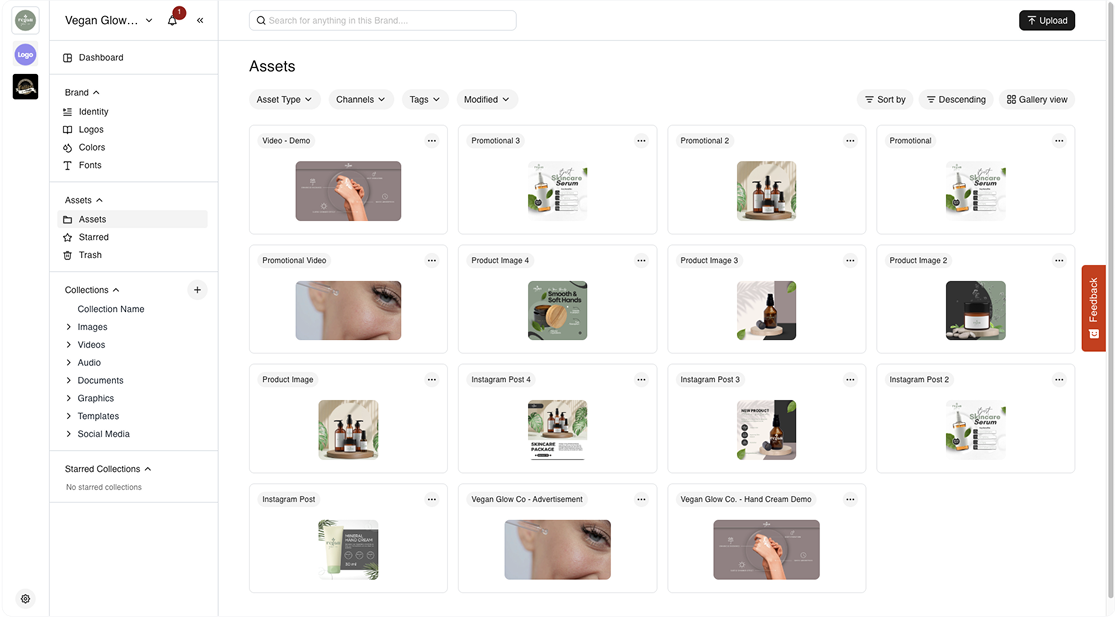
BrandLife gives marketing, brand, and creative teams one place to organize assets and the guidelines around them. Teams can use AI-powered tagging and search, version control, approval workflows, secure sharing, and brand portals. Integrations connect the library with tools including Canva, Figma, Google Drive, Dropbox, SharePoint, OneDrive, and Slack.
Multi-brand workspaces keep each client, product line, or sub-brand separate. That makes BrandLife especially useful for agencies and growing organizations managing more than one brand.
BrandLife’s Starter plan begins at $150 per month. Enterprise pricing is custom for teams that need broader scale, security, support, or implementation. Review current plan details and add-ons before choosing your setup.
Frequently asked questions
What is marketing asset management?
Marketing asset management is the process of organizing, approving, distributing, maintaining, and retiring marketing files and content. It connects people and governance with the technology used to store assets.
What is marketing asset management software?
Marketing asset management software helps teams store, search, approve, share, and control marketing assets. Common features include metadata, AI tagging, version history, permissions, brand portals, and integrations with creative or storage tools.
Is marketing asset management different from digital asset management?
They’re closely related. Digital asset management refers to the software and central library used to organize digital files. Marketing asset management describes the broader workflow, rules, and responsibilities used to manage those assets across their lifecycle.
When is a DAM better than Google Drive or Dropbox?
A DAM becomes useful when teams need more than file storage. Common triggers include repeated asset requests, poor search, outdated versions, approval bottlenecks, partner distribution, rights management, or several brands sharing one system.
What features should marketing teams compare?
Compare search and tagging, portals, approvals, permissions, integrations, analytics, and multi-brand support. Test each platform with real tasks and review costs for users, storage, brands, implementation, support, and add-ons.